Lip sync to your own audio
OmniHuman 2.0 does not invent a voice. It moves the mouth, face and head to the exact audio you give it, so the clip runs as long as the track. Here a script was read by a text-to-speech voice and the photo did the rest.

One portrait plus a voice or a song becomes a lip-synced 720p video, 4 seconds to 5 minutes long. By ByteDance, run through the Renoise Agent.
Every clip below is real OmniHuman 2.0 output made in Renoise from the photo shown in the corner. Hover to hear it.
OmniHuman 2.0 does not invent a voice. It moves the mouth, face and head to the exact audio you give it, so the clip runs as long as the track. Here a script was read by a text-to-speech voice and the photo did the rest.
Vocals drive it as well as speech. Give it a song with a sung lead and the face follows the melody: held notes, breaths and the beat. A pure instrumental track is rejected, because there is no voice to follow.
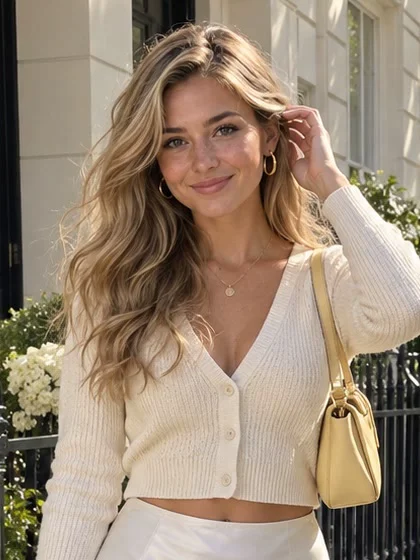
Audio can run from 4 to 300 seconds, and the video is one continuous take of the same length, with no stitching. This 24-second story keeps the face, glasses and scarf steady from the first word to the laugh at the end.

The prompt is optional, but it steers expression, hands and camera. This one asked for counting on the fingers and a slow push-in. Write it in English, Chinese, Japanese, Korean, Spanish or Indonesian; framing still follows the photo.

The mouth follows the sounds of the audio, not an English script, so a voice track in another language works the same way. This greeting is Japanese text-to-speech; swap the track to dub one portrait into several languages.

OmniHuman is ByteDance’s audio-driven human video model: one photo of a person plus a voice track becomes a video of that person talking or singing, with lips, face, head and hands moving to the sound. OmniHuman 2.0, released by BytePlus on October 15, 2026, makes clips from 4 seconds to 5 minutes at 720p.
In Renoise, OmniHuman 2.0 runs through the Agent, on the same plan as 30+ other models. The Agent can write and voice the script first, with a preset voice or a voice cloned from your own recording, then hand the audio and your photo to OmniHuman.
Need 1080p or a moving scene rather than a talking head? Use Seedance 2.5. Need a short clip whose voice the model makes up? Use Grok Imagine Video.
Specs as available in Renoise, checked November 11, 2026.
Use one photo with the face and mouth clearly visible. Head-and-shoulders, half-body and full-body shots all work, at a width-to-height ratio between 0.4 and 2.5, and the video keeps the photo’s framing. Use your own face or one you are authorized to use.
Upload 4–300 seconds of speech or vocals as MP3 or WAV, or give the Agent the script: a preset text-to-speech voice costs about 2 credits a line, and a voice cloned from your authorized recording 20 credits. Avatar Studio has the same options as buttons.

Optionally say how they should move: expression, gestures, a push-in. The Agent quotes the credits before it runs. A 10-second track takes about 3 minutes; download a watermark-free MP4 with the audio already in it.
From the first OmniHuman paper to OmniHuman 2.0 in the Renoise Agent.
ByteDance researchers publish OmniHuman-1: one image plus audio or video drives a portrait, half-body or full-body human. No public release.
The follow-up adds clips over a minute, scenes with several people and text control of camera and actions. It later powers avatars in ByteDance’s Dreamina app.
BytePlus releases OmniHuman 2.0: audio of 4–300 seconds, native 720p, an optional prompt in six languages.
Renoise opens OmniHuman 2.0 to its Agent and MCP at 14 credits per second of audio.
Sources: OmniHuman lab pages and arXiv, BytePlus OmniHuman 2.0 API documentation, Renoise release records. Last updated
Renoise runs only 2.0. Here is how it differs from OmniHuman 1.5, comparing the two BytePlus APIs.
OmniHuman 1.5 takes under 60 seconds of audio per clip. OmniHuman 2.0 takes 4 to 300 seconds, so a full explainer or a whole verse and chorus fits in one take.
OmniHuman 1.5 renders 720p or 1080p. OmniHuman 2.0 renders native 720p only. For 1080p, use a general video model such as Seedance 2.5.
OmniHuman 1.5 can be told which person in a photo should speak. The 2.0 API has no such control, so for a two-person scene, make one clip per speaker and cut between them.
The image limit rises from 5 MB to 30 MB, at 300–6,000 pixels per side, so phone photos go in without resizing.
Three Renoise video models that can put words in a person’s mouth, compared on the limits Renoise exposes.
| In Renoise | Grok Imagine Video 1.5 | Seedance 2.5 | |
|---|---|---|---|
| Where to use it | Agent, API, MCP | Videos menu, Canvas, Agent | Videos menu, Canvas, Agent |
| Voice comes from | Your audio track | The model | The model or audio references |
| Clip length | 4–300s, follows the audio | 1–15s | 4–30s |
| Max resolution | 720p | 720p | 1080p |
| Credits · 10s at 720p | 140 | 170 | 320 |
| Best for | Long talking or singing takes in a set voice | Short talking clips, quick drafts | Scenes with motion, 1080p |
Renoise model list and credit estimates (checked 2026-11-11).
As of October 2026, 100,000+ creators in 170+ countries and regions use Renoise AI, an AI video, image and audio platform, to generate 300,000+ images and videos with 30+ models.
Source: Renoise internal data, March–October 2026. Figures are rounded down and updated quarterly. Last updated
Real feedback from creators who use Renoise AI to make videos, images and ads.
Renoise is pretty easy to use, with a clean and smooth interface. The results from Seedance 2.5 also feel noticeably smoother in action sequences.
Renoise Ai is a good tool for making ai videos and photos. it puts several Ai models in one place, so you don't need to use many different apps.
あまりAIツールを使ったりしたことなかったですが、キャラクターの固定や動画を続いて作成できて使いやすいです。これからどんどん進んでいくアップデートが楽しみです。
Renoise has been a great platform for AI creativity. The tools are easy to use, the experience is smooth, and it makes creating content more enjoyable and efficient. I really appreciate the work the team is doing and look forward to seeing more improvements. Highly recommended!
What I like about Renoise AI compared to other platforms: Fast generation speed: Slow generation takes up way too much time, but Renoise AI is surprisingly about 30% faster. Intuitive and user-friendly UI: Cheaply made platforms have terrible UIs that make me not even want to log in, but Renoise is very clean and convenient. Remembers my previous settings: It helpfully remembers my last workspace settings. Some odd platforms force you to re-adjust everything every single time you generate a video, which is extremely frustrating. Overall preference: For all these reasons, Renoise AI is definitely my preferred platform. Thank you!
Renoise is your go to one stop all for ai creators. all view and use all models in one place, for any type of content you have your mind on!
I have a creat experience with the app. Consistent characters but also unique. THere were some issues with storyline continuity and non-typical humanoid characters.
One Renoise plan unlocks OmniHuman 2.0 and every other video, image and audio model, billed per generation from your plan credits.
For your first AI creations
per month
≈ 150 GPT Image 2 Generations
≈ 60 Seedance 2.0 videos
The agent takes your idea all the way to a finished cut.
Starter and Standard: production work in Director Mode uses credits by usage. Advanced: free.
No queue. Start as many paid generations as you want at once.
Content generated with Renoise.ai may be used commercially, subject to our Terms of Service
For creating every week
per month
≈ 450 GPT Image 2 Generations
≈ 180 Seedance 2.0 videos
The agent takes your idea all the way to a finished cut.
Starter and Standard: production work in Director Mode uses credits by usage. Advanced: free.
No queue. Start as many paid generations as you want at once.
Renoise Agent runs on frontier models from leading AI labs to plan your shots, write prompts, and pick the right model for each one. Chatting with the Agent is free on every plan.
Content generated with Renoise.ai may be used commercially, subject to our Terms of Service
For professional-scale production
per month
≈ 1,750 GPT Image 2 Generations
≈ 700 Seedance 2.0 videos
The agent takes your idea all the way to a finished cut.
Starter and Standard: production work in Director Mode uses credits by usage. Advanced: free.
No queue. Start as many paid generations as you want at once.
Renoise Agent runs on frontier models from leading AI labs to plan your shots, write prompts, and pick the right model for each one. Chatting with the Agent is free on every plan.
Content generated with Renoise.ai may be used commercially, subject to our Terms of Service
For your first AI creations
per month, billed annually
Save $48compared to monthly
≈ 150 GPT Image 2 Generations
≈ 60 Seedance 2.0 videos
The agent takes your idea all the way to a finished cut.
Starter and Standard: production work in Director Mode uses credits by usage. Advanced: free.
No queue. Start as many paid generations as you want at once.
Content generated with Renoise.ai may be used commercially, subject to our Terms of Service
For creating every week
per month, billed annually
Save $216compared to monthly
≈ 450 GPT Image 2 Generations
≈ 180 Seedance 2.0 videos
The agent takes your idea all the way to a finished cut.
Starter and Standard: production work in Director Mode uses credits by usage. Advanced: free.
No queue. Start as many paid generations as you want at once.
Renoise Agent runs on frontier models from leading AI labs to plan your shots, write prompts, and pick the right model for each one. Chatting with the Agent is free on every plan.
Content generated with Renoise.ai may be used commercially, subject to our Terms of Service
For professional-scale production
per month, billed annually
Save $960compared to monthly
≈ 1,750 GPT Image 2 Generations
≈ 700 Seedance 2.0 videos
The agent takes your idea all the way to a finished cut.
Starter and Standard: production work in Director Mode uses credits by usage. Advanced: free.
No queue. Start as many paid generations as you want at once.
Renoise Agent runs on frontier models from leading AI labs to plan your shots, write prompts, and pick the right model for each one. Chatting with the Agent is free on every plan.
Content generated with Renoise.ai may be used commercially, subject to our Terms of Service
Yes. BytePlus released the OmniHuman 2.0 API on October 15, 2026, and Renoise opened it to its Agent on October 23, 2026. In Renoise you ask the Agent for it, or call `omnihuman-2.0` through the API, CLI or MCP; it is not listed in the Videos model menu.
OmniHuman comes from ByteDance’s research team, who published OmniHuman-1 and 1.5 as papers. BytePlus, ByteDance’s cloud business, sells OmniHuman 2.0 as an API. Renoise does not train video models: it integrates OmniHuman 2.0 next to Seedance, Kling, Grok and others on one plan.
As long as the audio: anything from 4 to 300 seconds, in one continuous take. You cannot set the length separately, so trim the audio to the length you want. For more than 5 minutes, split the audio and join the clips in an editor.
720p only, and the framing follows your photo: a vertical portrait gives a vertical video, a landscape shot a landscape one. OmniHuman 2.0 has no 1080p option. For 1080p footage of a person in a moving scene, use Seedance 2.5 instead.
In Renoise, 14 credits per second of audio, rounded up to the next second: a 10-second clip is 140 credits, a minute 840 and the full 5 minutes 4,200. A text-to-speech voice adds about 2 credits a line; a cloned voice 20. See pricing for plans.
No. OmniHuman 2.0 is billed per generation from the credits in your Renoise plan, and it is not part of any Unlimited offer. The shortest clip, 4 seconds of audio, costs 56 credits.
No. ByteDance has published the OmniHuman-1 and 1.5 papers on arXiv, but no model weights, code release or app, and its lab page says it offers no downloads. OmniHuman 2.0 is only available as an API, through BytePlus or platforms such as Renoise.
Yes. Give it a song with a sung vocal and the face follows the melody, as in the singing example above, made from a song generated in Renoise. A purely instrumental track is rejected. Use a clip of the song rather than the whole track to keep the cost down.
Yes. Upload a recording of yourself, or let the Agent clone your voice from a short authorized recording and read any script with it. Only use another person’s face or voice with their permission.
One clip follows one voice track; OmniHuman 2.0 has no control over who speaks, so make one clip per speaker. BytePlus says cartoons and animals work; we have not tested that in Renoise. For other avatar platforms, see Renoise vs HeyGen.
Yes. Videos you make on a paid Renoise plan are watermark-free and can be used in ads, product pages and client work. You need the rights to the face and the voice: your own, or someone who has authorized you. Do not depict public figures or minors.
Upload a portrait, give the Agent a script or a recording, and get a lip-synced talking or singing video.