Your face, held
Face shape, eyes, nose, mouth, skin tone and hair are pinned by the instruction. On our test selfie the stubble pattern and the individual curls came back recognisable.
Upload one ordinary photo of yourself, pick a look, and the model reshoots it — new backdrop, wardrobe and lighting, same face.
Sign up and get 20 free credits — about 5 images
For your own photo, or photos you’re authorized to use.
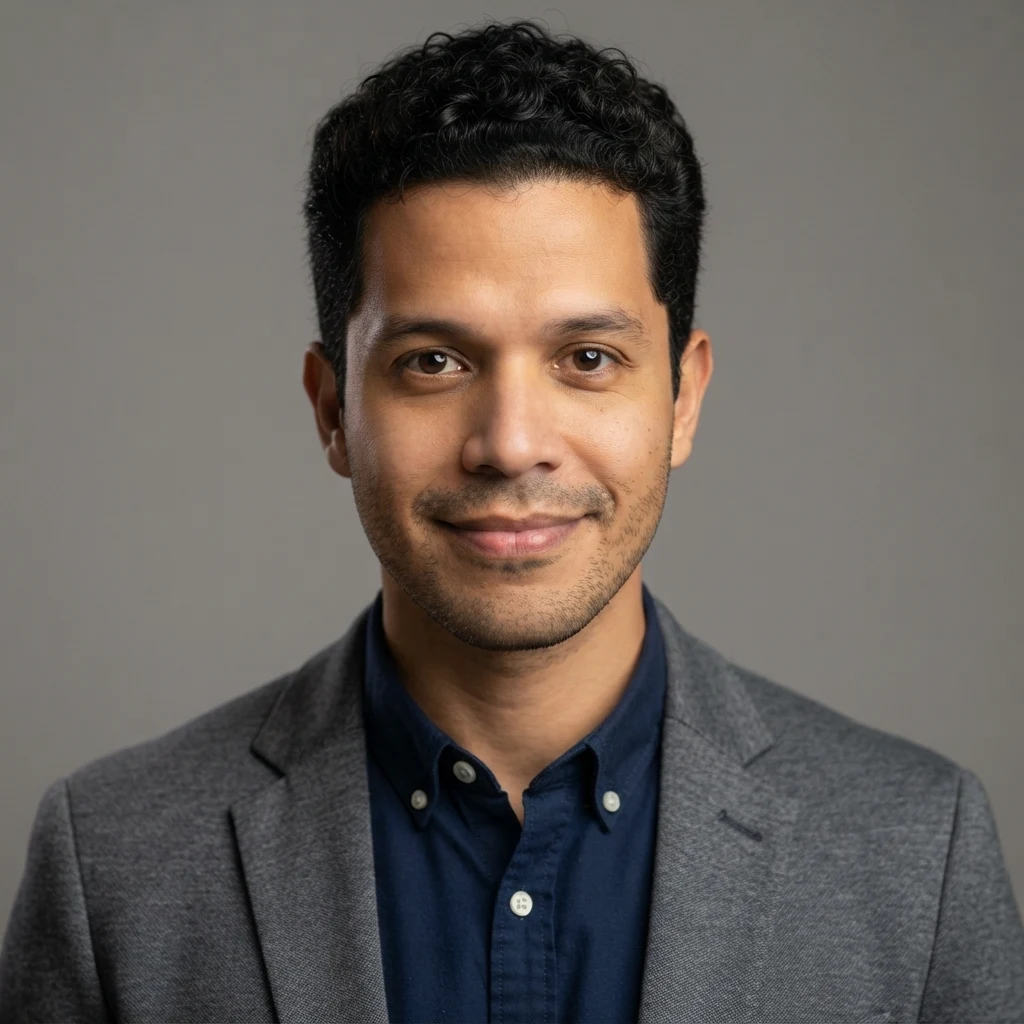
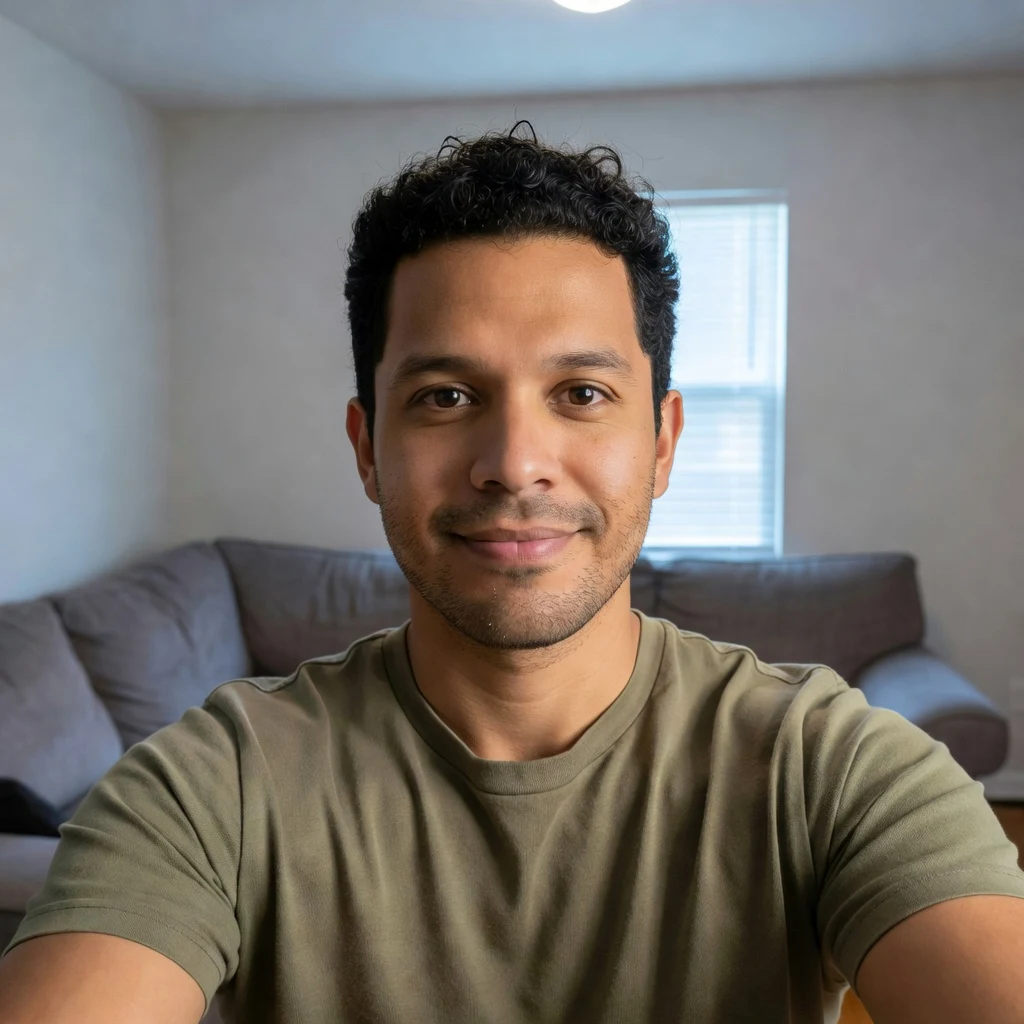
Real model output on an AI-generated fictional person — drag the handle to compare.
You upload one photo of yourself and the model reshoots it: it keeps your face and rebuilds everything around it — backdrop, wardrobe, lighting, the way the lens renders depth. Nothing is trained on you and there is no waiting for a model to finish; each look is a single run of about half a minute. Signing up puts 20 credits on the account and one run costs 4, so the first five looks are covered.
Want a headshot for LinkedIn or a CV specifically? That is a different job — see the AI headshot guide
The face is the fixed point. Everything else is what you are paying a photographer for, and it is what the model rebuilds.
Face shape, eyes, nose, mouth, skin tone and hair are pinned by the instruction. On our test selfie the stubble pattern and the individual curls came back recognisable.
Flat indoor light becomes a soft key with a rim, or low golden sun behind the hair. This is the part a phone camera cannot give you.
Seamless studio grey, a park thrown out of focus, or a deep coloured editorial set — with clothes to match the setting.
This page reshoots a person. Product and packaging shots are a different pipeline and a different page.
No account needed to try the controls; sign in when you run it.
A plain phone selfie is exactly the right input. What matters is that your face fills a decent part of the frame — the table below shows what happens when it does not.
Studio, outdoor, editorial or everyday. Add wardrobe or mood notes in the optional field if you have something specific in mind.
Each look costs 4 credits and the 20 credits you get on signup cover five. Download at full resolution.
Tested 2026-09-02 on our own AI-generated portraits, on the exact model this page runs. Read the third row carefully: it is the only failure here that comes back looking like a success.
| Your source photo | Result | Why |
|---|---|---|
| Phone selfie, face fills much of the frame | Good — the case this page is built for | On our test the face was roughly 460 pixels tall; identity held across all three looks |
| Ordinary, unflattering indoor lighting | Good — this is the point | Flat light carries no information the model needs to keep, so it is free to replace it |
| Distant or full-body shot, face very small | ⚠️ Comes back as a different person | A face ~20 pixels tall carries no identity to preserve, so the model invents one. The output looks like a great headshot — of someone else. Crop to your face first |
| Group photo | Not supported — one face per run | Crop to a single person before uploading |
| Heavy filter, motion blur or very dark | Unpredictable | Same reason as the distant shot: what the model cannot resolve, it has to invent |
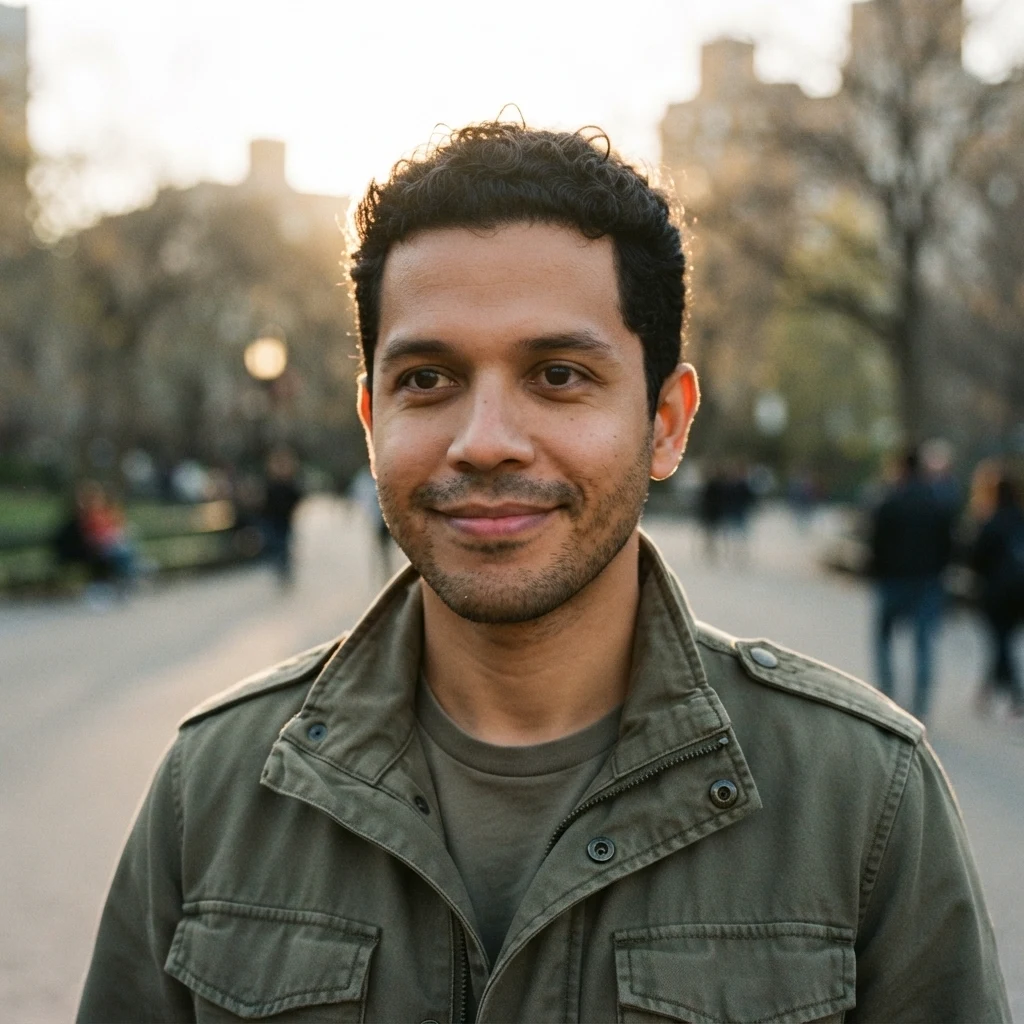
The same AI-generated fictional person, reshot by this page. Real outputs, not mockups — including the ordinary selfie they all started from.
Flat indoor light, living room behind, phone-camera look. Deliberately ordinary: this is the input the page is designed around.
Seamless backdrop, soft key with a rim light, smart casual. Compare the stubble and the curls against the source — that is the identity claim.
Golden hour in a park, background thrown out of focus, low sun catching the hair.
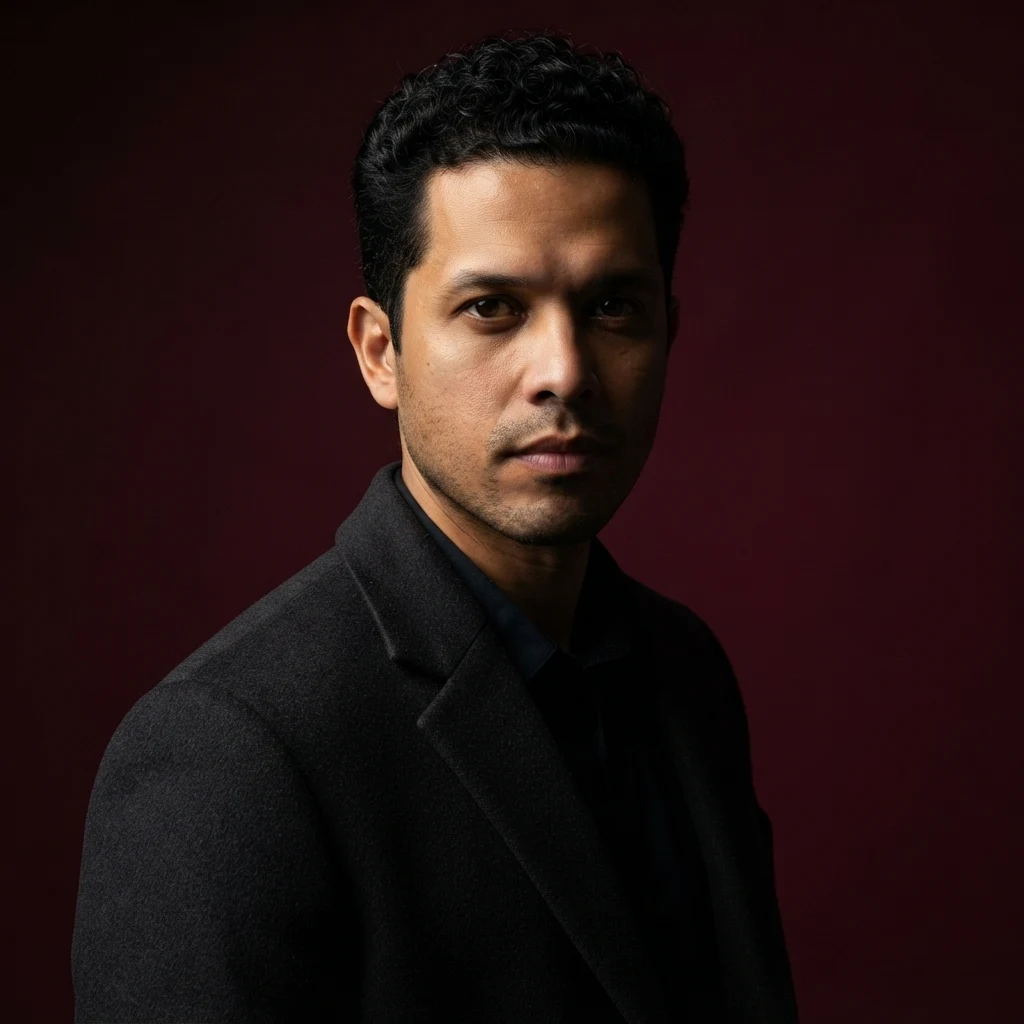
Hard side light on a deep coloured set, tailored overcoat. The biggest departure from the source, and the one that most rewards a sharp input.
This is the only question that matters on a page like this, so here is the measured answer rather than a promise. What runs is a generative image-to-image reshoot on Nano Banana 2 Lite (Google), and the instruction it receives pins your face — shape, eyes, nose, mouth, skin tone, hair — while releasing everything else. On our test selfie, where the face was roughly 460 pixels tall, all three looks came back with the stubble pattern and the individual curls intact. You would recognise him. That is the honest strength of the tool.
And here is the honest limit, which we found by trying to break it. We fed in a wide shot of a person standing across a plaza, where the face was about 20 pixels tall — twenty-three times smaller. The tool returned a beautifully lit studio headshot. It was not the same person. Nothing had gone wrong mechanically; there was simply no identity in those twenty pixels to preserve, so the model supplied a plausible face instead. This is the one failure on this page that looks like a success, and it is why the upload hint asks for a photo where your face fills a good part of the frame. We have two data points, not a curve, so we are not going to quote you a pixel threshold — but the shape of the rule is clear: the more face you give it, the more of you comes back.
One boundary and one honest scoping note. Reshoot your own photo, or one you are authorized to use — not someone else's picture without their consent, and never a public figure or a minor. And if what you actually need is a headshot for LinkedIn or a job application, this is not the page: that job has stricter expectations about neutrality and framing than a fast-tier reshoot should claim to meet, and we keep a separate guide for it.
This page runs the fast tier on purpose. Nano Banana 2 Lite costs 4 credits a run, which is what makes "the 20 credits you get on signup cover five looks" a sentence we can keep — five different looks is a photoshoot, and one run of a flagship model would be most of the grant. For putting an ordinary selfie into a studio, the fast tier is the right instrument, and every sample on this page came out of it.
When you want more, open the full image workspace: every model on the platform is there, including Nano Banana Pro, and you keep working on one canvas instead of re-uploading between steps. That is also where to go if you want to push a single frame much further — retouching, a different aspect ratio, or carrying one look across a whole set. If the next thing you want is motion, the video models take a still as their opening frame.
What happens to an uploaded photo — the question an AI photoshoot should answer first.
Picking a file only previews it on your device. Not one byte is stored until you sign in and click generate.
Uploads land in your private library, never a public gallery, and re-running the same photo stores nothing new.
Remove uploads and results from your library whenever you want.
Credits work across every tool — image editing, upscaling and the video models.
Run the other looks, refine a frame on the canvas, or turn it into a short clip.
You upload one photo and the model produces a new image of you in a different setting: it is told to keep your face and to rebuild the backdrop, wardrobe, lighting and lens character around it. There is no training step and no queue — each look is a single run of roughly half a minute.
On a photo where your face fills a good part of the frame, yes — we ran three looks off one selfie (face about 460 pixels tall) and the face shape, stubble and curls survived all three. On a distant shot where the face was about 20 pixels tall, no: the model had nothing to preserve and invented a face. That result still looks good, which is exactly why we are telling you about it.
One. Tools that ask for ten or twenty are training a small model on your face, which costs time and money and locks you into whatever it learned. This page reshoots the single photo you give it, so you can change looks immediately and swap the source photo whenever you like.
A headshot is a narrow job with strict expectations — neutral framing, conservative wardrobe, something a recruiter will accept. A photoshoot is the opposite: several looks, more lighting drama, more variety. This page does photoshoots on the fast tier and deliberately does not claim to produce a CV-ready headshot; we keep a separate guide for that.
Signing up puts 20 credits on the account and one look costs 4 credits, so five looks are covered. We would rather give you that arithmetic than the word "free" — the credits are shared across every tool, so those 20 credits could equally go to upscaling or video.
Nano Banana 2 Lite, from Google. It is the fast tier, chosen so one look costs 4 credits and the signup grant stretches to five. Every before/after image on this page is real output from it, generated on an AI-generated fictional person rather than a real one.
Yes — that is what the four looks do, and the optional field takes wardrobe or setting notes on top. One thing the style wording deliberately avoids: naming a specific magazine or brand. We tried that while testing and the model rendered a real magazine masthead onto the image, which is not something you want on a photo of yourself.
Only with their consent. Use your own photo or one you are authorized to use — never someone else's picture without permission, and never a public figure or a minor. Nothing is stored before you sign in.
No. This page is built around preserving a human face, and every instruction it sends is about that. Product and packaging photography is a different pipeline with different constraints — the product-focused pages cover it.
