Guide
How to Build a Website with Claude, Art and Video Included
Claude Code can build a website from a few sentences, but it cannot draw. Most "build a website with Claude" tutorials end with stock photos, a gradient or a 3D library. This one does not. We connected Renoise to Claude Code and made a one-page site in a single chat: Claude wrote the HTML, and Renoise generated the illustrations, the moving pictures and the voice on the page. That came to twenty stills, four clips and 394 credits.
What you need
- Claude Code, or Claude on the web or desktop. We used Claude Code because the page is a folder of files on disk.
- A Renoise account with credits. Writing the page costs nothing on Renoise; the stills and clips are billed per generation. Our page cost 394 credits (the breakdown is below). See pricing.
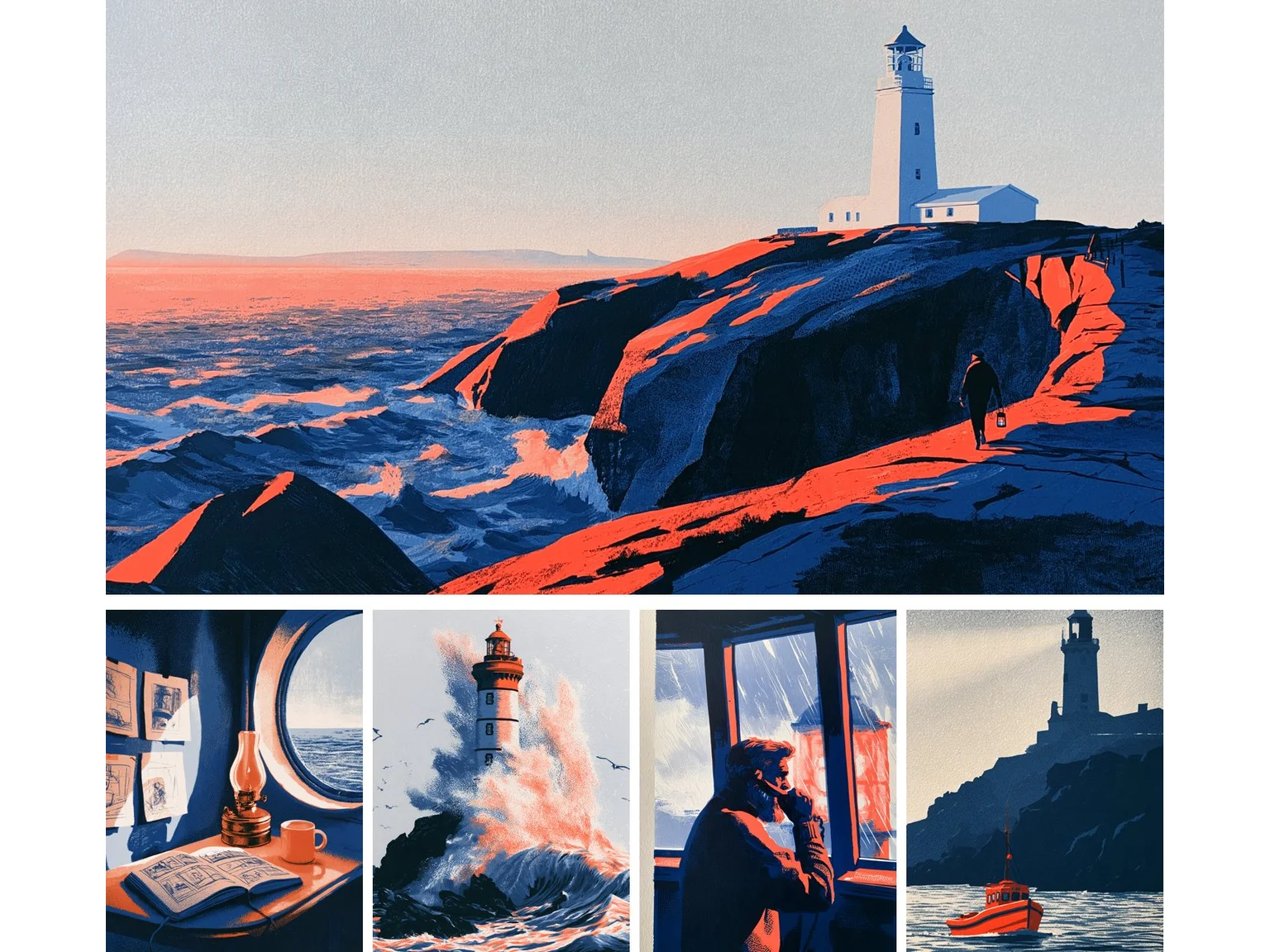
- One idea in a few sentences. Ours: a lighthouse keeper on a stormy night, five scenes from first light to a boat coming home.
Step 1: Connect Renoise to Claude Code
In Claude Code, install the Renoise plugin:
claude plugin marketplace add renoise-ai/renoise-plugins-official
claude plugin install renoise@renoise-plugins-official
Sign in when Claude asks. To check the connection, ask "Tell me my Renoise account and credits"; if Claude answers with your balance, it works. In claude.ai or the Claude desktop app, add Renoise as a connector instead; both ways are on renoise.ai/mcp. More on what Claude can do once connected: generate video in Claude.
Step 2: Write one style paragraph and reuse it in every prompt
Pictures on one page have to look like they came from one artist. Image models drift a little with every prompt, so the reliable fix is to write the style once, word for word, and put the same paragraph at the start of every prompt. Only the last sentence, the scene, changes.
Our hero prompt, style paragraph first and scene last:
For the four plates, only the last sentence changed:
- The keeper's desk inside the lighthouse: an open sketchbook of rough storyboard frames, more sketches pinned to the curved wall, a brass oil lamp and a mug, a round window showing the sea.
- A huge wave breaking over the black rocks below the lighthouse, spray rising high against the tower, gulls wheeling in the wind.
- The keeper, a grey-bearded man in a wool sweater, speaking into an old radio handset in the lamp room, rain streaking the tall windows, the great lens glowing behind him.
- A small red fishing boat rounding the headland on calm morning water, the lighthouse behind it, its beam fading into daylight.
Three things in that prompt do most of the work. Two named inks (cobalt blue and vermilion) keep the palette from wandering. A physical process (risograph, gouache, paper grain) gives every image the same texture. "The upper half of the frame an empty pale sky" in the hero scene leaves room for the page title, so the text sits on calm paper instead of on the waves.
Step 3: Generate the stills and pick one of four
We used Midjourney V8.2, which returns four images per prompt. That is the point at this stage: you are choosing, not hoping. Five prompts gave twenty stills; we kept five.
- Hero: 16:9 at 2K, 6 credits for four images.
- Plates: 3:4 at 1K, 4 credits for four images each.
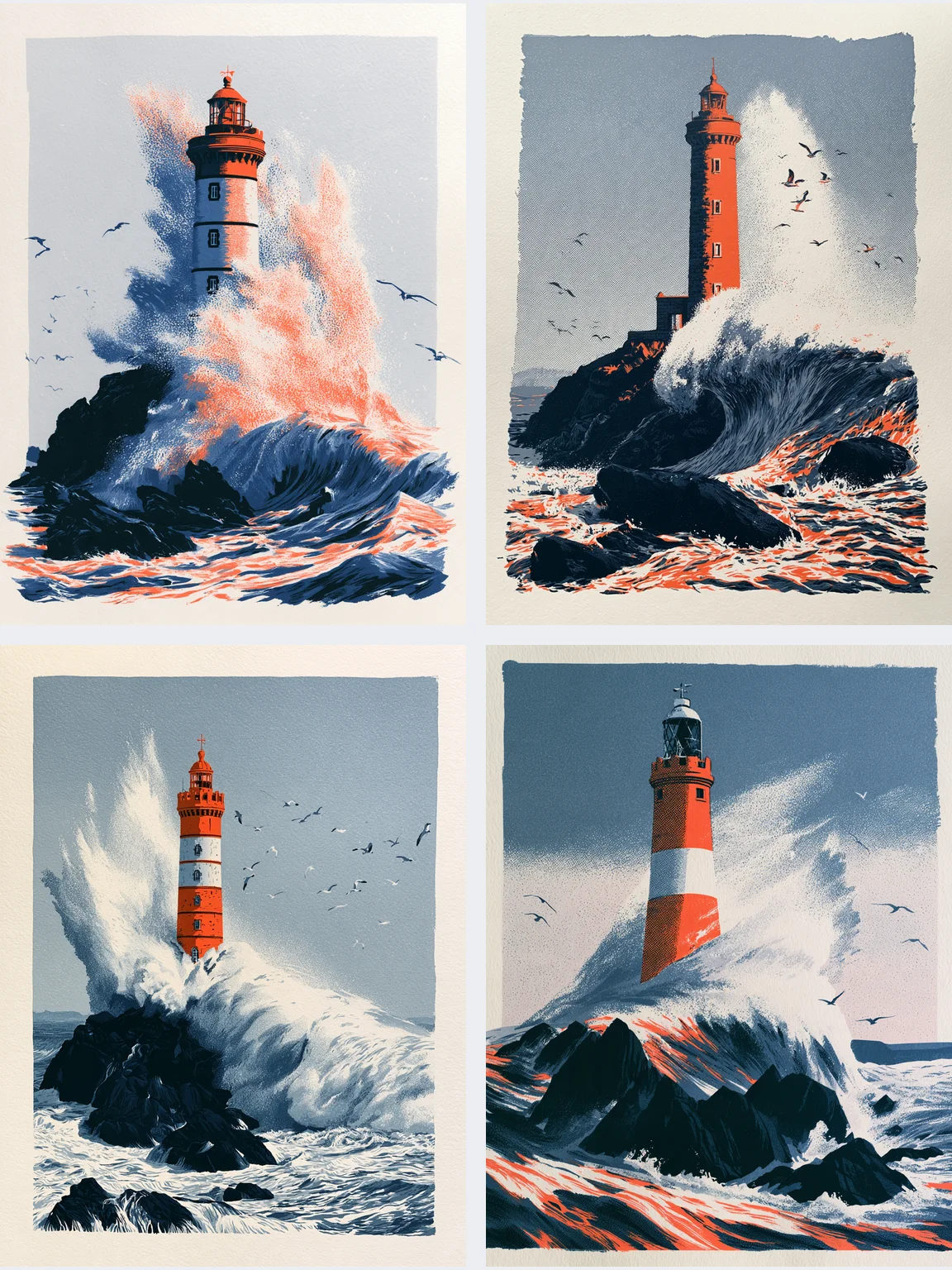
Pick for the next step, not only for looks. A good first frame for video has a clear subject, space for things to move into, and nothing cut off at the edge that the video model would have to invent. The outputs also come with a painted paper margin; we cropped it off so the video model would animate the picture and not the border.
Step 4: Turn the stills into a video background with Wan 3.0
Wan 3.0 can start a clip from a picture you give it (first-frame mode). Because the clip begins on your still, you can use that still as the video's poster image on the page, and the moment the video starts playing is invisible.
The prompt says what moves, says the camera does not, and asks for the style to stay:
The sea swells and breaks gently against the headland, the keeper walks slowly
along the cliff path with his lantern swinging, thin clouds drift across the pale
sky. The camera holds still. Keep the hand-printed risograph look, paper grain and
two-colour palette exactly as in the first frame.
"The camera holds still" matters on a website: the text sits on top of the hero, and a moving camera would drag the composition out from under it. "Exactly as in the first frame" keeps the model from repainting the illustration in its own style halfway through.
For the hero we made 8 seconds at 1080p (24 credits per second). The three plates are smaller on the page, so they are 5 seconds at 720p (12 credits per second, 60 credits each).
Step 5: Give one clip a voice
Wan 3.0 can generate sound in the same pass. Turn audio on and write the exact line in the prompt, in quotes, along with the sounds around it:
The keeper holds the handset to his ear and says calmly: "Harbour, this is the
light. The storm is passing. Bring them home." Rain runs down the windows, the
light behind him pulses slowly. Audio: his voice through a crackling radio, rain
on glass, no music.
The speech-to-text check on the result returned the line word for word. Audio did not change the price: this clip cost 60 credits, the same as the silent plates.
Step 6: Ask Claude to build the page around the clips
With the stills and clips downloaded into the project folder, the rest is an ordinary Claude Code request. Describe the page section by section and say how the media should behave. These are the instructions that made the difference on ours:
- Muted, inline autoplay. Browsers only autoplay video that is muted, and phones need
playsinlineor the video opens full screen. - The still as the poster. Each video shows its own first frame before it loads, so nothing flashes or jumps.
- Load videos only when they scroll into view. Our page lazy-loads the plate clips with an IntersectionObserver, so the first screen loads only the hero.
- Play the hero once and hold the last frame. A generated clip ends in a different place from where it starts; looping it shows a jump (see the next section).
- Sound behind a button. The voiced clip plays muted and has a "Play sound" button, because browsers block autoplay with sound.
- Respect reduced motion. Visitors who turn off animations in their system settings see the stills, with play controls on the plates.
Claude wrote the page as one HTML file of about 39 KB, plus a media folder and one small data file, so it runs on any static host. The text on the page (title, captions, the production log) came from the same chat, so the numbers on the page match what was actually generated.
Check every clip before it goes on the page
A clip generated from a still can look right in the first second and wrong in the fourth. We checked each clip on a contact sheet of six frames per second before Claude put it on the page. Of the four:
| Clip | Problem | Fix on the page |
|---|---|---|
| Hero, 8 s | Ends far from where it starts, so a loop jumps | Plays once, holds the last frame |
| Wave, 5 s | After 2 s the rocks turn into a brown islet | Kept small; a retake is 60 credits |
| Voice, 5 s | Line correct; lip sync not yet checked | Muted until the visitor presses play |
| Boat, 5 s | Stray light shaft at 2.3–3.0 s; loop jump | Kept small; a retake is 60 credits |
The brown islet matters more than it sounds: brown is not one of the two inks, so it breaks the set even at a glance.
Two habits catch most of this. Look at the middle and the end of each clip, not just the start, since drift shows up late. And loop every clip once before you let it loop on the page.
What the page cost
All prices are what Renoise charged in this session, on November 24–25, 2026, at list price.
| What | Model | Settings | Credits |
|---|---|---|---|
| Hero still (4 options) | Midjourney V8.2 | 16:9, 2K | 6 |
| 4 plate stills (4 options each) | Midjourney V8.2 | 3:4, 1K | 16 |
| Hero clip | Wan 3.0 | 8 s, 1080p, first frame | 192 |
| 3 plate clips (one with voice) | Wan 3.0 | 5 s, 720p, first frame | 180 |
| Total | 20 stills, 4 clips | 394 |
The video is 94% of the bill, and the hero alone is half of it. To spend less, make the plates shorter or keep some of them as stills. How credits convert to money depends on your plan; see pricing and our AI video cost guide.
Using the same recipe for other pages
The method does not depend on lighthouses. A product page can use one style paragraph for every product shot and a slow first-frame clip in the hero; a portfolio can give each project its own moving plate. If the page needs the same character in several scenes, add a character sheet as a reference; our character consistency guide covers that. And if you would rather make a whole animated episode than a page, the same connection does that too: how to make anime with Claude.