A Christmas video with your face, from one selfie
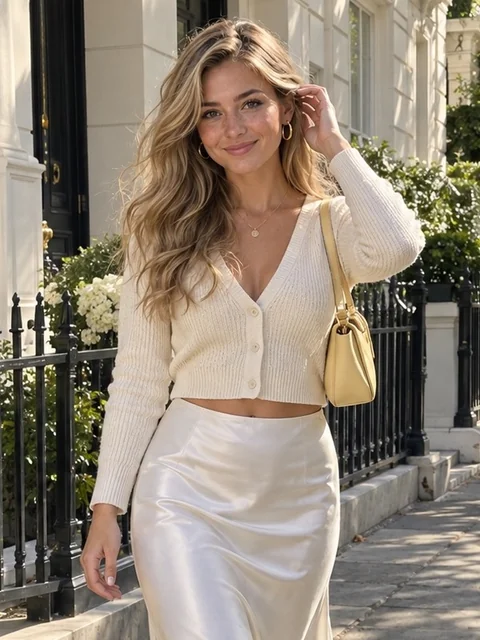
A street photo becomes a night walk through a Christmas market. Her wavy hair, hoops and freckles hold through the walk and the smile.
Upload a photo of you, your partner or your pet. The Renoise Agent turns it into a short AI Christmas video with motion and sound, then changes it until you like it.
Opens in the Renoise Agent. It shows the credit cost before it generates. Photos of adults and pets only.
Real Seedance 2.5 output from one photo of an AI-generated fictional person, sound included.
Four real outputs from Seedance 2.5 at 720p, five seconds each. Turn the sound on: the music and sleigh bells were generated with the picture.
A street photo becomes a night walk through a Christmas market. Her wavy hair, hoops and freckles hold through the walk and the smile.
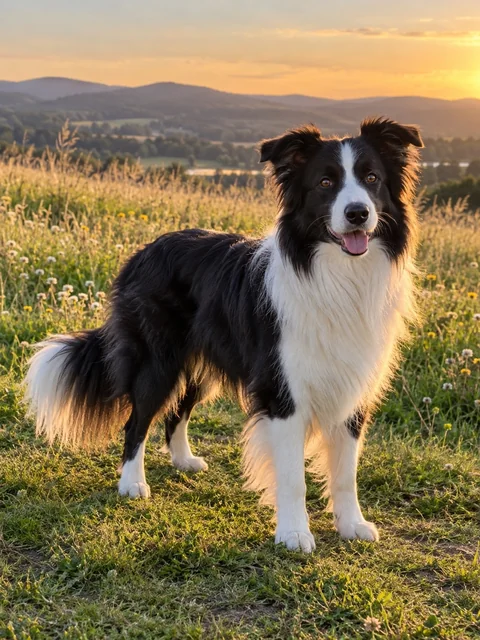
One photo of a border collie in a field. In the clip she wears a Santa hat by the tree, tilts her head and paws at a present.
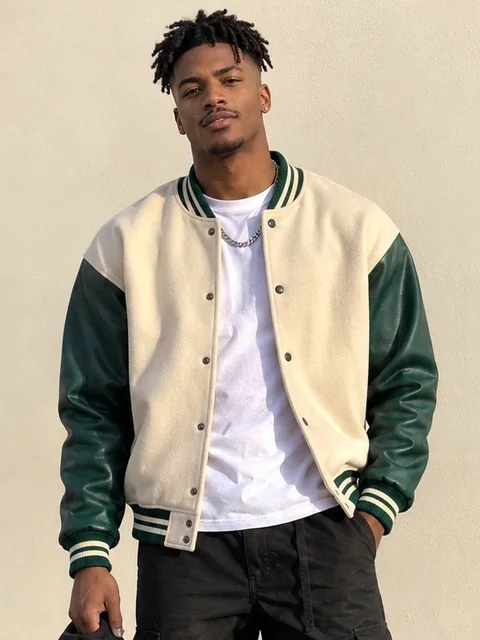
Two separate photos, one shot: she hangs an ornament, he puts an arm around her, and they turn to each other laughing.
Text only, in 16:9: Santa’s sleigh crosses the moon over a snowy village, with open sky left at the top for your greeting.
What you get on top of the clip itself.
Music, bells and fire crackle are generated with the picture, at no extra cost.
The Agent picks the video model for the job. Every example here is Seedance 2.5.
Ask for more snow, a longer cut or another scene in the same chat.
9:16 for Reels and TikTok, 16:9 for cards and YouTube, 1:1 for posts.
Upload one clear, front-facing photo, describe the Christmas scene and what should happen in it, and the Renoise Agent generates a short video with sound — a 5-second clip at 720p took about three to five minutes in our tests. Add a second photo to put a partner or a pet in the same shot, or skip the photo for a scene-only Christmas card.
The Agent shows the credit cost before it generates, and you can ask for changes afterwards in the same chat.
Want a still Christmas photo instead? Try the AI Christmas photo generator
One photo and one sentence. The Agent writes the shot, picks the model and adds the sound.
A clear photo of you, a partner or a pet, face visible. Two photos put two subjects in one shot.
Edit the default prompt or tap Fireside Pet, Couple by the Tree or Video Card.
Approve the credit cost, then download the MP4 with sound, or ask for changes.
What each page says about its own tool. VideoWeb AI (videoweb.ai/ai-christmas-video-generator) and Ima Studio (imastudio.com/ai-christmas-video-generator) were read on 9 November 2026; our figures were measured the same day.
| What the page tells you | VideoWeb AI | Ima Studio | |
|---|---|---|---|
| What you upload | One or two photos, or just text | One portrait photo or text, plus a style | Text, a template, photos or a logo |
| Model named | ✓ Seedance 2.5 in the examples | Not stated | Not stated |
| Length and size | 4–30 s, up to 1080p | Not stated | 9:16, 1:1, 16:9, up to 4K |
| Sound | Generated with the video | AI music and sound effects | Music, voiceover, captions |
| Price per video | 160 credits for 5 s at 720p | Not stated | Not stated |
Faces held in all three of our test clips made from photos. The model got one front-facing photo per person or pet as a reference and kept the face shape, hair colour, earrings, freckles and the dog’s black-and-white markings from the first frame to the last. That was with [Seedance 2.5](/models/seedance-2-5) at 720p; the Agent can also pick another model from [AI video](/features/ai-video).
What drifts is the detail that moves. In the couple clip the man’s short twists grow longer as he turns his head, and the "matching" sweaters came out in the same red and green but with different patterns. The Santa hat on the dog slides forward when she bends down. If one of these matters, ask for it in the same chat: a tighter shot, a shorter turn, or one sweater described in detail for both people.
Five seconds holds one action: a walk and a smile, or a head tilt and a paw. For a longer story, ask for 10 or 15 seconds (Seedance 2.5 goes up to 30) or for two clips cut together. Longer and sharper clips cost more: 10 seconds at 720p is 320 credits and 5 seconds at 1080p is 360.
Words drawn inside the video are hit and miss, so the card example keeps open sky for a greeting you add in an editor. Use photos of yourself, or of people who agreed to be in the video. The Agent does not make Christmas videos of children.
What happens to an upload on this page.
Picking a file only previews it on your device. Not one byte is stored until you sign in and click generate.
Uploads land in your private library, never a public gallery, and re-running the same photo stores nothing new.
Remove uploads and results from your library whenever you want.
As of October 2026, 100,000+ creators in 170+ countries and regions use Renoise AI, an AI video, image and audio platform, to generate 300,000+ images and videos with 30+ models.
Source: Renoise internal data, March–October 2026. Figures are rounded down and updated quarterly. Last updated
Real feedback from creators who use Renoise AI to make videos, images and ads.
Renoise is pretty easy to use, with a clean and smooth interface. The results from Seedance 2.5 also feel noticeably smoother in action sequences.
Renoise Ai is a good tool for making ai videos and photos. it puts several Ai models in one place, so you don't need to use many different apps.
あまりAIツールを使ったりしたことなかったですが、キャラクターの固定や動画を続いて作成できて使いやすいです。これからどんどん進んでいくアップデートが楽しみです。
Renoise has been a great platform for AI creativity. The tools are easy to use, the experience is smooth, and it makes creating content more enjoyable and efficient. I really appreciate the work the team is doing and look forward to seeing more improvements. Highly recommended!
What I like about Renoise AI compared to other platforms: Fast generation speed: Slow generation takes up way too much time, but Renoise AI is surprisingly about 30% faster. Intuitive and user-friendly UI: Cheaply made platforms have terrible UIs that make me not even want to log in, but Renoise is very clean and convenient. Remembers my previous settings: It helpfully remembers my last workspace settings. Some odd platforms force you to re-adjust everything every single time you generate a video, which is extremely frustrating. Overall preference: For all these reasons, Renoise AI is definitely my preferred platform. Thank you!
Renoise is your go to one stop all for ai creators. all view and use all models in one place, for any type of content you have your mind on!
I have a creat experience with the app. Consistent characters but also unique. THere were some issues with storyline continuity and non-typical humanoid characters.
One plan covers Seedance 2.5 and every other video, image and audio model the Agent uses.
For your first AI creations
per month
≈ 150 GPT Image 2 Generations
≈ 60 Seedance 2.0 videos
The agent takes your idea all the way to a finished cut.
Starter and Standard: production work in Director Mode uses credits by usage. Advanced: free.
No queue. Start as many paid generations as you want at once.
Content generated with Renoise.ai may be used commercially, subject to our Terms of Service
For creating every week
per month
≈ 450 GPT Image 2 Generations
≈ 180 Seedance 2.0 videos
The agent takes your idea all the way to a finished cut.
Starter and Standard: production work in Director Mode uses credits by usage. Advanced: free.
No queue. Start as many paid generations as you want at once.
Renoise Agent runs on frontier models from leading AI labs to plan your shots, write prompts, and pick the right model for each one. Chatting with the Agent is free on every plan.
Content generated with Renoise.ai may be used commercially, subject to our Terms of Service
For professional-scale production
per month
≈ 1,750 GPT Image 2 Generations
≈ 700 Seedance 2.0 videos
The agent takes your idea all the way to a finished cut.
Starter and Standard: production work in Director Mode uses credits by usage. Advanced: free.
No queue. Start as many paid generations as you want at once.
Renoise Agent runs on frontier models from leading AI labs to plan your shots, write prompts, and pick the right model for each one. Chatting with the Agent is free on every plan.
Content generated with Renoise.ai may be used commercially, subject to our Terms of Service
For your first AI creations
per month, billed annually
Save $72compared to monthly
≈ 150 GPT Image 2 Generations
≈ 60 Seedance 2.0 videos
The agent takes your idea all the way to a finished cut.
Starter and Standard: production work in Director Mode uses credits by usage. Advanced: free.
No queue. Start as many paid generations as you want at once.
Content generated with Renoise.ai may be used commercially, subject to our Terms of Service
For creating every week
per month, billed annually
Save $216compared to monthly
≈ 450 GPT Image 2 Generations
≈ 180 Seedance 2.0 videos
The agent takes your idea all the way to a finished cut.
Starter and Standard: production work in Director Mode uses credits by usage. Advanced: free.
No queue. Start as many paid generations as you want at once.
Renoise Agent runs on frontier models from leading AI labs to plan your shots, write prompts, and pick the right model for each one. Chatting with the Agent is free on every plan.
Content generated with Renoise.ai may be used commercially, subject to our Terms of Service
For professional-scale production
per month, billed annually
Save $720compared to monthly
≈ 1,750 GPT Image 2 Generations
≈ 700 Seedance 2.0 videos
The agent takes your idea all the way to a finished cut.
Starter and Standard: production work in Director Mode uses credits by usage. Advanced: free.
No queue. Start as many paid generations as you want at once.
Renoise Agent runs on frontier models from leading AI labs to plan your shots, write prompts, and pick the right model for each one. Chatting with the Agent is free on every plan.
Content generated with Renoise.ai may be used commercially, subject to our Terms of Service
Not here. Chatting with the Agent costs nothing; generating does. The 5-second, 720p clips on this page cost 160 credits each with Seedance 2.5, and 480p is 80. The 20 credits you get for following Renoise on X and YouTube do not cover one clip. Credits come with every plan and in top-up packs.
Yes. Make the still in the AI Christmas photo generator, then upload it here and describe the motion: falling snow, a wave to the camera, a pet looking up. For any other photo, photo to video does the same without the Christmas scene.
Yes. The sound is generated with the picture: music, sleigh bells, fire crackle, crowd murmur. Name what you want in the prompt, or ask for no music if you plan to add your own track.
The examples are 5 seconds. Seedance 2.5 makes 4 to 30 seconds in one clip, and the price grows with length and resolution: 160 credits for 5 seconds at 720p, 320 for 10 seconds.
Ask for 9:16 for Reels, TikTok and Stories, 16:9 for a video card or YouTube, and 1:1 for a feed post. Resolution goes from 480p to 1080p.
A Santa scene, yes: Santa by the tree or flying past the moon, as in the card example. A personal message where Santa talks to your child by name is a talking-head video; make that with the AI avatar generator from a Santa image and a voice track. Neither needs a photo of the child.
No. This page takes photos of adults and pets only, and the Agent does not generate videos of children.
The one that keeps your face, adds sound and lets you fix what is off. Check whether a tool names its model and its price per clip: most Christmas video pages state neither. This page shows its real outputs, the model (Seedance 2.5) and the credits each clip cost.
No. Failed and cancelled generations refund their credits automatically. The usual causes are a face the model cannot read — small, turned away or shadowed — or the content filter declining the photo.