Guide
How to remove filler words from audio
To remove filler words from audio, transcribe what was actually said, identify the removable sounds in context, and cut their recorded intervals. Keep the surrounding words and enough space for the sentence to breathe.
That sounds straightforward. When we tested this on an English recording, we found a problem before the first cut: the initial transcript had already smoothed over some of the speech. A readable transcript is useful for captions. An editing transcript needs to preserve the hesitations you want to remove.
Listen to the original and the edit
This is an excerpt from “A conversation with Randy Olson,” a 2011 U.S. Fish and Wildlife Service recording. It is a human recording, not a synthesized example with inserted filler words. The edited version uses the same voice and recording speed.
Original · 38.20 seconds
Edited · 35.47 seconds
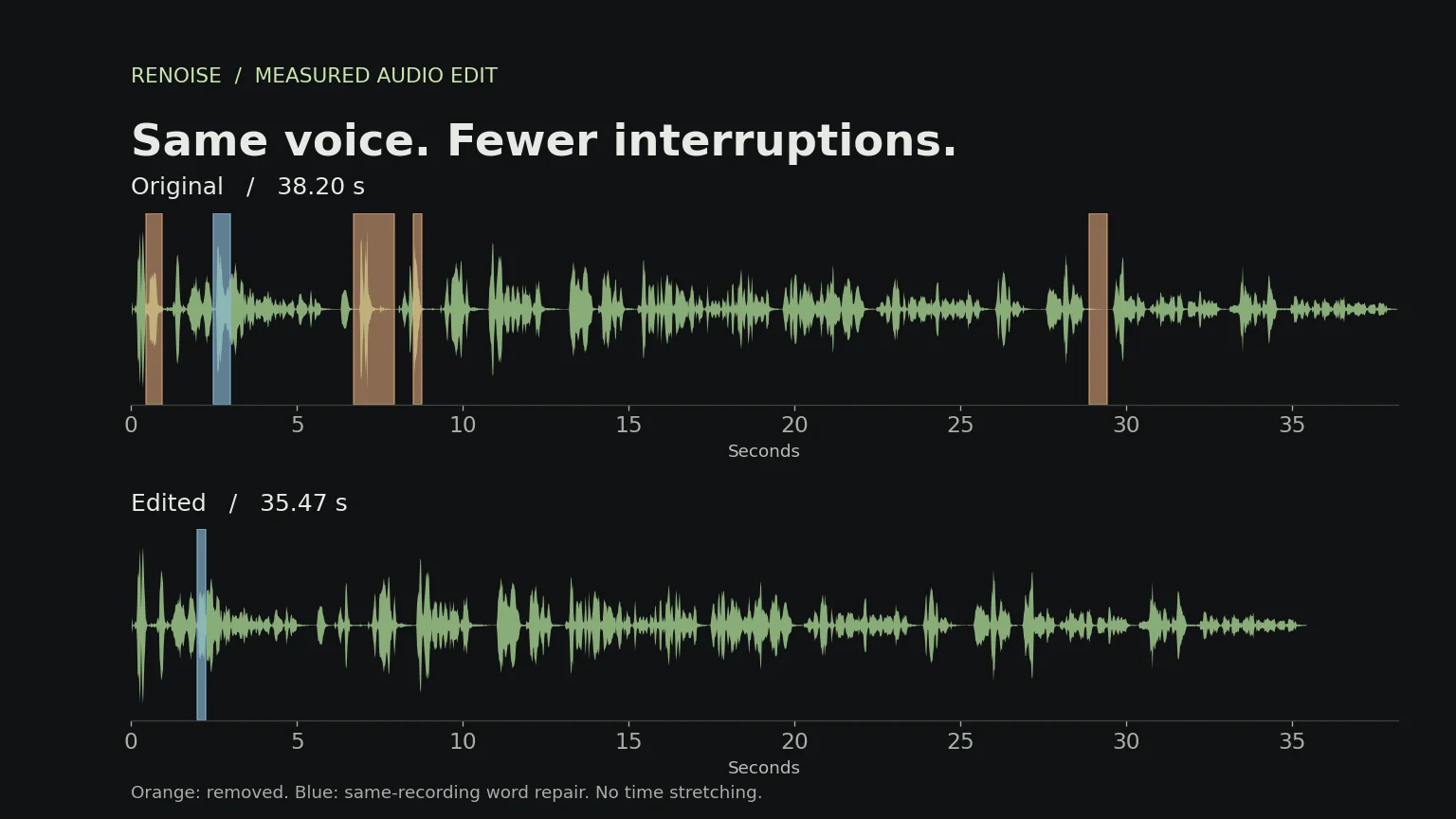
Listen for the repeated “the” near the opening, the throat-clearing sound before “I think,” the “um,” and the pause after “the fact was.” The opening “I don’t” splices in the speaker’s own “I don’t” from later in this recording. No voice generation or speed change.
The source file and attribution identify the recording as a public-domain U.S. government work. We took an excerpt, edited a copy, and exported both files in the same audio format. Neither the speaker nor the publisher endorses Renoise or this experiment.
Compare three short phrases
Struck-through words are present in the original and removed in the edit. Bracketed sounds and pauses are editorial annotations, not spoken words. These reading transcripts follow the agent-corrected text; they are not a human-verified verbatim reference.
1. Remove a repetition and repair a rough phrase
Original · 5.90 s
Well, the the quote message really, I don’t even know if it’s so much of a message as it is more painting a picture.
Edited · 5.17 s
Well, the quote message really, I don’t even know if it’s so much of a message as it is more painting a picture.
Remove the repeated article; repair “I don’t” using the same words from elsewhere in this recording. Keep “so much,” where “so” carries meaning. This example includes a speech splice, not just a deletion.
2. Remove the hesitation, keep the qualifier
Original · 9.00 s
And [throat clear] I think, um, my feeling was that Al Gore’s movie, An Inconvenient Truth, was a valiant effort.
Edited · 7.54 s
And I think my feeling was that Al Gore’s movie, An Inconvenient Truth, was a valiant effort.
Remove the throat-clearing sound, the excess gap around it, and “um.” Keep “I think.” It qualifies the statement; deleting it would change the speaker’s stance.
3. Shorten a pause without changing the words
Original · 4.54 s
And the fact was [0.80 s pause] we weren’t all in agreement in two thousand six.
Edited · 3.99 s
And the fact was [0.25 s pause] we weren’t all in agreement in two thousand six.
The words stay the same. Remove 0.55 seconds from the gap, leaving a short pause.

First, preserve the words you may want to remove
Our prototype uses Qwen3-ASR-1.7B for speech recognition and Qwen3-ForcedAligner-0.6B for word timing. Both come from Alibaba’s Qwen team. The official implementation can return a transcript with word-level timestamps.
Those are two different jobs. Recognition proposes the words. Alignment estimates where those words occur in the recording. If recognition leaves out an “um,” asking an aligner to locate the remaining transcript does not recover that missing word.
In our first pass, Qwen omitted a repeated “the” near the opening. A second pass with an explicit verbatim instruction recovered it, but still omitted an “um” identified by a separate audio-model check. We restored that “um” to the transcript and realigned the excerpt. We also separated words that the aligner had joined across an em dash.
This is an agent-corrected transcript, not a human-verified reference or a fully automatic filler detector. The phrase comparisons above let you inspect where the passes differed. A verbatim instruction helped in this sample; it did not solve every omission.
Keep the original audio available throughout the process. Review gaps that contain audible speech but no transcript text. A breath, laugh, unfinished syllable, or hesitation can occupy such a gap; none should become an automatic deletion just because the transcript has nothing there.
Detect sounds that a transcript can miss
Coughs and throat clearing need a separate audio-event review. A speech transcript may omit them or stretch a neighboring word across them. In this recording, the aligner assigned “I” a span of 7.12–8.32 seconds, including an unwanted vocal event around 7.1–7.5 seconds. An earlier recognition pass placed “I” at 8.24–8.32 seconds. Protecting the longer word span would also protect the unwanted sound.
We used YAMNet, an open audio-event classifier, to flag candidate regions. Its 0.96-second analysis window beginning at 6.72 seconds scored strongly for cough and throat clearing. These scores are not calibrated probabilities, and the window is too coarse to use directly as a cut.
The edit removes the event and excess space around it, keeping the neighboring “And” and “I think” and about 230 ms of their intervening gap. Boundary selection uses the waveform and the conflicting word-timing evidence. The precise cough-versus-throat-clear label is less important than locating the unwanted sound without clipping speech. Listening remains the final check; event classification alone cannot approve a join.
When a rough sound overlaps speech
A rough sound near the opening could not be isolated reliably from “I don’t even know.” Deleting the surrounding speech would risk losing the negation. The example therefore includes a same-recording word repair: we replace the audio at 2.670–3.180 seconds in the source with the speaker’s “I don’t” from 15.745–16.010 seconds of this recording. Both source intervals are recorded in the edit map. This preserves the intended words without synthesizing a voice; it is not a demonstration of automatic cough removal.
The donor phrase receives about 3 dB of gain and 5 ms fades at the joins. It is 245 ms shorter than the replaced interval. A human reviewer accepted this local repair. That assessment applies only to this example; it does not establish that word splicing works on other recordings. Match meaning, voice, delivery and room sound; if a suitable donor or a clean join is unavailable, retain the speech and request a retake or review.
Do not use an event classifier’s low score to overrule a listener’s report. Our audio-model reviews also produced incorrect words and event descriptions. Transcripts and audio models can help flag a problem, but a plausible model output is not proof that the join sounds right.
How an agent should decide what to delete
The objective is clearer speech with the same meaning, not the shortest possible recording. The following is a recommended editing policy. Our sample demonstrates a few decisions; it does not establish an automatic detector for every case below.
Use three decisions: delete, keep, or review
Delete only when the passage is unnecessary for the requested style, the remaining sentence preserves the speaker’s meaning, and the sound can be cut cleanly. Keep meaningful speech. Review anything uncertain; review candidates stay in the audio until resolved.
| Candidate | Default decision and reason |
|---|---|
| An isolated “um” while searching for a word | Delete if it is dispensable and the join is clean. Keep an affirmative “uh-huh” or an expressive sound that carries intent. |
| An accidental “the the” restart | Delete one article after checking the sentence. Keep deliberate emphasis such as “very, very important.” |
| “Like,” “so,” “well,” or “you know” | Review in context. Keep “like” in a comparison and “so” when it connects cause and result. A word list alone cannot decide. |
| “Tuesday—sorry, Wednesday” | Review. A concise narration may use the corrected wording; an interview or quotation may need the correction preserved. |
| “I think,” “might,” “about,” or “not” | Keep when removal changes certainty, quantity or meaning. Never treat these as filler solely because they make a sentence longer. |
| An unwanted cough or throat clear | Flag with audio-event evidence, then inspect its boundaries. Remove only when separable from speech; overlapping speech needs review. Do not rely on an empty transcript or an event score alone. |
| A breath, laugh or pause | Keep when it supports delivery, emotion or turn-taking. Shorten only a dispensable gap. |
| Overlapping speakers or an unclear word boundary | Review; retain the passage when a clean edit cannot be established. |
Apply six guardrails before rendering
- Set the editing goal. A brisk tutorial and a reflective interview need different pacing. Without a more specific brief, make conservative cleanup edits and preserve tone.
- Read the whole thought. Check the sentence before and after a candidate. Remove a false start only if the completed wording replaces it without losing a detail or changing the speaker’s position.
- Protect factual meaning. Preserve negations, qualifications, names, numbers, units and conditions. Do not splice distant statements into a new claim or silently alter a quotation.
- Require usable audio evidence. A word omitted by ASR is not an empty gap. Correct and realign the transcript first. Reject zero-length or conflicting timing; do not guess a cut through a neighboring sound.
- Preserve rhythm. Leave useful breaths and thought boundaries. The 250 ms gap target in this experiment is adjustable, not a rule for every pause. Do not remove two pauses separately without checking the combined gap after a word deletion.
- Make every change reversible. Record source word IDs, exact text and a reason. Preview each join and the full passage. If a word is clipped or the rhythm is worse, undo the edit or adjust the boundary rather than accepting it because a score passed.
For this recording, the policy yields three concrete choices: remove the duplicated “the,” remove the isolated “um,” and keep “I think.” We also keep “so” in “so much of a message,” where it modifies degree.
Give the agent an inspectable editing brief
Goal: tighten this recording while preserving meaning and tone.
For each candidate, return DELETE, KEEP, or REVIEW.
Include source word IDs for speech, source intervals for non-speech events,
and a contextual reason. Review coughs and throat clearing separately from words.
Preserve factual qualifiers, negations, quotations and emphasis.
Do not invent wording or remove content to meet a duration target.
Flag uncertain transcription, timing or intent for review.
Leave REVIEW candidates untouched. Execute only accepted DELETE edits.
Return the edit list, original audio, edited audio and source-time map.
The agent proposes decisions; the renderer validates the referenced spans and applies the accepted edits. Neither step replaces listening to the result.
Protect neighboring sounds at each cut
Word timestamps are estimates, not guaranteed safe cut points. A consonant can extend across a predicted boundary. Some aligned tokens can even have identical start and end times. Reject those as deletion targets rather than inventing a duration.
Our renderer checks the selected token spans against their neighbors. It searches a small window around each accepted boundary for a lower-amplitude sample, then joins the retained pieces. This reduces a waveform discontinuity, but it cannot establish that a syllable survived. That still needs listening.
Deletion joins use a 3 ms fade inside each retained edge; the word-repair joins use 5 ms fades. These are short fades to and from zero, not overlapping crossfades. They do not overlap or shorten the retained audio. A long crossfade is not a substitute for a good cut: it can overlap speech or smear a consonant.
For stereo production audio, perform the edit on the original channels with one shared time map. Our listening experiment uses a mono analysis copy; it is not a demonstration of mastering-quality stereo export.

Shorten pauses selectively
Silero VAD estimates which regions contain speech. We use that information alongside measured signal energy to guard candidate pause edits. It does not decide whether a word is redundant or whether a pause is emotionally important.
In this prototype, an eligible low-energy, non-speech gap can be shortened to 250 ms. That is an experiment setting, not a universal rule for interviews or narration. The policy also considers the combined gap left after a filler deletion, rather than granting separate pause budgets on either side.
Keep pauses that separate ideas, support a joke, or let a difficult answer land. If applying a rule makes the speaker sound hurried, undo the cut or leave more space. Removing every silence is not the same as improving the delivery.
What changed in this recording
We used source time 0:00.20–0:38.40, retaining the passage through “man-made climate change.” The source excerpt is 38.200 seconds. The edit is 35.468 seconds: a 2.732-second net reduction, or about 7.2%. This includes 2.487 seconds of deletion and a 245 ms reduction from the word repair.
| Edit | Full-source interval | Duration reduction |
|---|---|---|
| Second “the” in the opening restart | 0.647–1.128 s | 0.480 s |
| Same-recording “I don’t” repair | Replace 2.670–3.180 s with donor 15.745–16.010 s | 0.245 s net |
| Throat-clearing event and excess surrounding gap | 6.918–8.127 s | 1.209 s |
| “um” after “I think” | 8.713–8.961 s | 0.248 s |
| Part of the gap after “the fact was” | 29.085–29.635 s | 0.550 s |
We kept “so” in “so much of a message” because it modifies degree. We kept “I think” because it qualifies the speaker’s point. We did not delete repeated ideas inside the quoted passage. One pause met the automatic gap-cutting checks. The separate event review shortened the gap containing the throat-clearing sound; other gaps were retained.
The output passed full decoding and sample-count checks, and the original WAV is an exact slice of the analysis recording. Those checks do not establish perceptual quality. The local word repair was accepted by a human reviewer. That spot check does not replace listening to the full edited recording or establish general model accuracy. We do not score naturalness from timestamps alone.
These numbers describe one excerpt and one edit policy. They do not measure recognition accuracy across accents, noisy rooms, overlapping speakers or spontaneous recordings in general. The source is a published interview excerpt, not a verified raw recording session.
Review the joins and the full thought
Listen to a short context window before and after each join, then play the entire edit at normal speed. The short windows expose clicks and missing consonants; the complete passage reveals rushed pacing or a change in meaning.
Keep a source-to-output map so each cut can be reversed and captions can be rebuilt against the edited timeline. Check the exported file as well as the preview. A successful decode proves that the file is readable; a second transcript can flag missing words. Neither proves that the edit sounds natural.
For a talking-head video, apply deletion timing to both picture and sound. A donor-word audio repair also requires a lip-sync check and may need a cutaway; using the audio map alone does not repair the mouth movement. Audio cleanup alone does not remove visible jump cuts. Review the picture and use a relevant cutaway or a second camera angle where appropriate. Our sample tests audio, not that visual workflow.
What it takes to reproduce
The workflow combines speech recognition and alignment, speech-region and audio-event detection, contextual edit decisions, and deterministic audio rendering. The speech models can run on a machine you control. The agent’s location and data handling depend on how you deploy it; choosing self-hosted ASR alone does not make every part of the workflow private.
On our NVIDIA L4 run, recognizing and aligning the full 110.42-second recording took 25.39 seconds after model loading. Loading took 37.09 seconds, and peak allocated GPU memory was 6.34 GiB. That timing is for the first pass, which missed the disfluencies discussed above; it excludes the corrective pass, separate audio-model review and final rendering.
Budget separately for setup, model loading, inference, any agent calls, and listening review. A single inference timing is not the end-to-end time or a cost-per-minute promise.
For more on creating videos with Renoise, see Renoise Agent and our guide to making a TikTok product video.