FPV & aerials
Drone swoops, stadium flythroughs, and crane reveals with no aircraft and no pilot.
Fly the camera anywhere — FPV swoops, orbits, and tracking shots from one still.
Describe the move in your prompt — "FPV drone shot swooping down into the stadium" — and Seedance 2.0 generates it. For a precise path, upload a still marked with the route you want as a reference image, and anchor the shot with a first and last frame. No drone, no rig, no closed venue.
Want the full set of motion controls? See the AI motion control guide
What you can pull off — and what you need to get there.
Drone swoops, stadium flythroughs, and crane reveals with no aircraft and no pilot.
Pan, tilt, dolly, truck, orbit, crane, tracking, zoom — directed by prompt and reference.
Start from a single frame; Seedance 2.0 builds the camera move around it.
Director-grade HD you can publish directly — Seedance 2.0 runs 4–15s at 720p or 1080p.
How the FPV stadium swoop above was made — using the controls Renoise actually gives you.
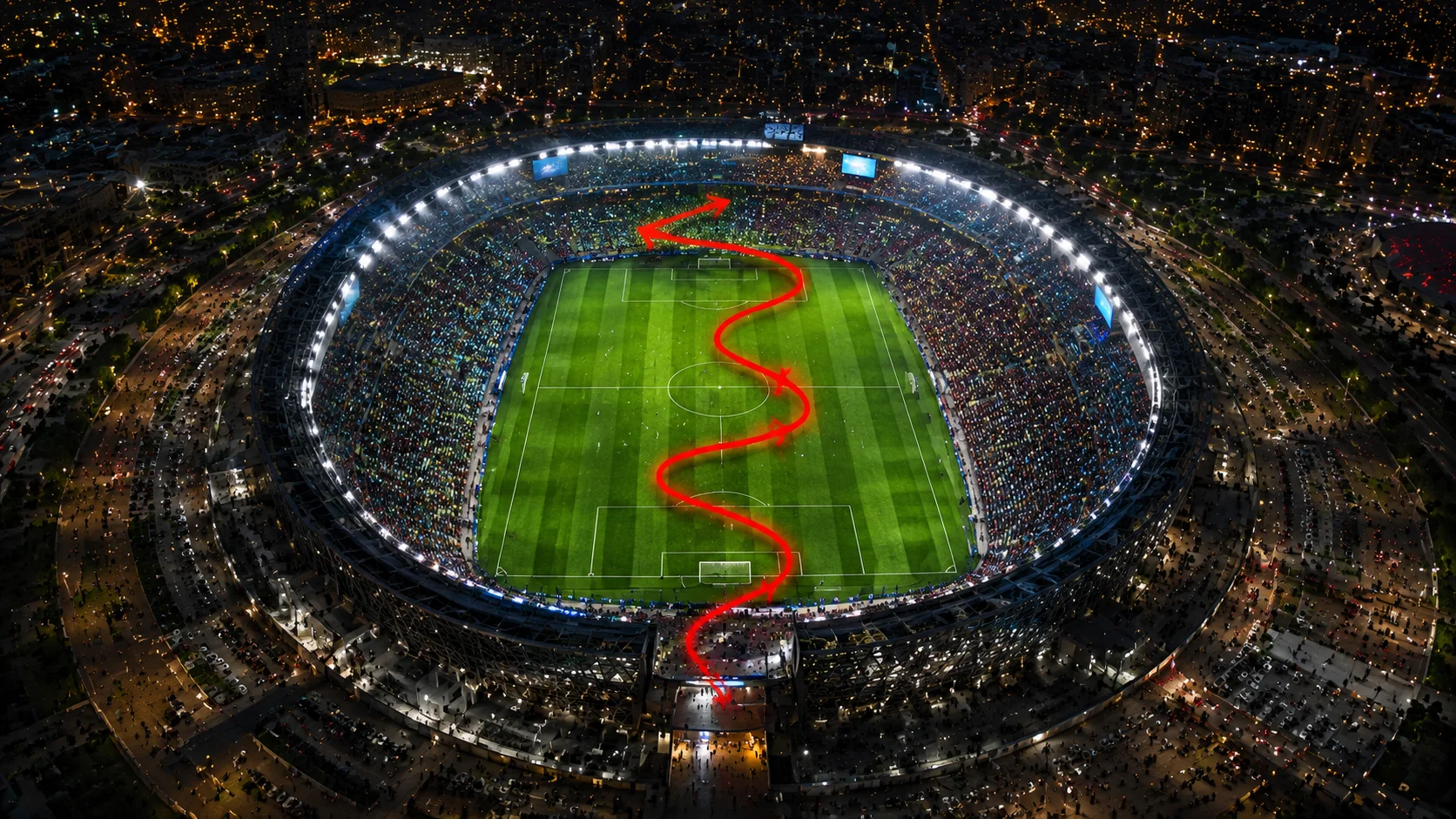
Take a still of your scene and mark the route the camera should fly — a simple line over the frame.
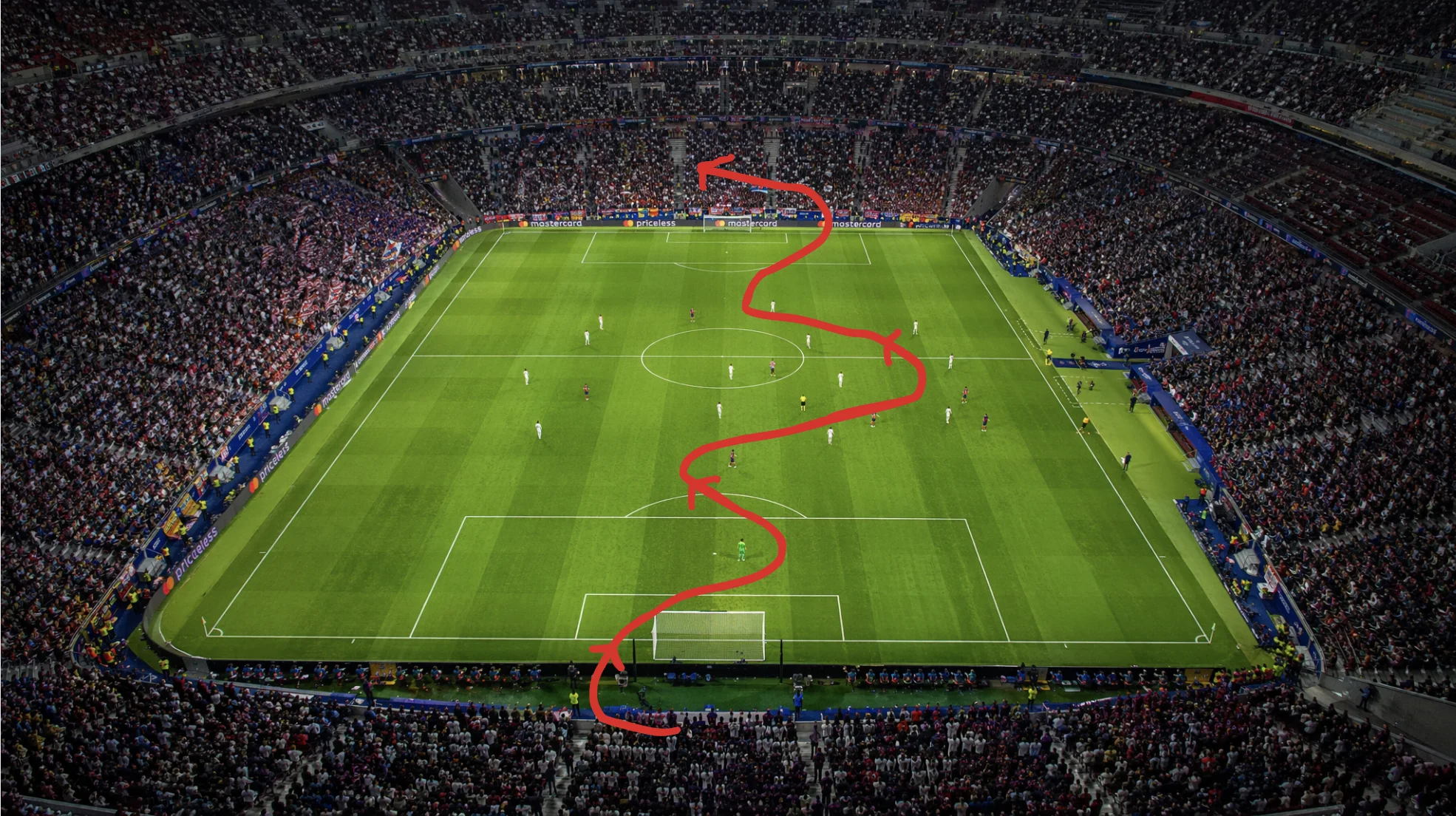
On the Canvas, add the marked still as a reference on Seedance 2.0 and prompt the move: "FPV drone shot down the line".
Pick a 16:9 ratio and generate. Seedance 2.0 flies the camera along the path in 720p or 1080p.
The same prompt-and-reference workflow, different moves — output at 720p or 1080p.
The camera sweeps sideways to follow the action across the pitch.
The camera locks onto a moving subject and travels with them.
Both live on the same Renoise Canvas — pick by the kind of move the shot needs. Specs from §5 of the model matrix.
| For camera movement | Seedance 2.0 | Kling 3.0 Omni |
|---|---|---|
| Best for | Frame-anchored single moves | Physics & multi-shot sequences |
| Path control | First/last frame + image reference | Physics simulation |
| Image references | Up to 9 | Up to 7 |
| Max shots | Single shot | Up to 6 |
| Max duration | 4–15s | 3–15s |
Camera movement is how the lens travels through a scene, and each type has a name worth knowing because it doubles as a prompt keyword. A pan rotates the camera left or right on a fixed point; a tilt does the same vertically. A dolly pushes the lens in or out, a truck slides it sideways, and a pedestal raises or lowers it. An orbit (or arc) circles a subject, a crane (or jib) lifts up and over, and a tracking shot locks onto a moving subject and travels with it. The FPV drone shot in the hero is the most kinetic of all — a continuous flight that swoops, dives, and threads through a space in one unbroken take.
In Renoise you get any of these by naming the move in your prompt — "slow orbit around the trophy as confetti falls", "low tracking shot behind the striker", "crane up to reveal the full stadium". Prompt wording is the steering wheel. For a move you want to land precisely, Seedance 2.0 lets you set a first and last frame so the camera travels between two images you choose, and it accepts up to nine reference images — which is where a still marked with the path you want comes in. That reference is read as guidance, not as a literal drawn trajectory: there is no motion-brush widget in Renoise, so the prompt, the frames, and the reference together direct the shot.
One honest caveat: AI camera movement is guided, not deterministic. The same prompt can read slightly differently each run, so generate a few takes and keep the one whose move feels right.
Camera movement leans on one video model and a few controls — all on one Canvas.
First/last-frame anchoring and up to 9 image references to steer the camera path.
Name the move — pan, orbit, FPV, tracking — directly in the prompt to steer the shot.
Physics motion and up to 6-shot sequencing when a move needs weight or multiple angles.
Switch between Seedance 2.0 and Kling 3.0 Omni per shot without leaving the Canvas.
One plan unlocks Seedance 2.0, Kling 3.0 Omni, and every other video model.
For first-time AI content creators
Billed $168 annually
Upgrade PlanSave $72/year
For creators shipping content every week.
Billed $504 annually
Upgrade PlanSave $216/year
For studios and pros producing at commercial scale.
Billed $1680 annually
Upgrade PlanSave $720/year
For first-time AI content creators
Billed monthly
Upgrade PlanFor creators shipping content every week.
Billed monthly
Upgrade PlanFor studios and pros producing at commercial scale.
Billed monthly
Upgrade PlanRenews automatically each year until canceled.
Renews automatically each month until canceled.
Direct FPV, orbit, and tracking moves, with watermark-free exports on paid plans.
Name the move in your prompt — "FPV drone shot swooping into the stadium", "slow orbit around the trophy" — and Seedance 2.0 generates it. For a precise route, upload a still marked with the path you want as a reference image and anchor it with a first and last frame.
Yes — that is the point. An FPV drone shot is a camera move, and Seedance 2.0 generates it from a still and a prompt. No aircraft, no pilot, no permit, and no closed venue needed.
There is no motion-brush or drag-a-path widget. You mark the route on a still in any image tool, upload that as a reference image to Seedance 2.0, and describe the move in the prompt — the reference guides the camera, it is not a literal drawn trajectory.
Pan, tilt, dolly, truck, pedestal, orbit (arc), crane (jib), tracking, zoom, and FPV flythroughs. Each is a prompt keyword — name the move and Seedance 2.0 builds the shot around your frame.
Seedance 2.0 runs 4 to 15 seconds at 720p or 1080p, in six aspect ratios from 21:9 to 9:16. Video output is 720p or 1080p — 4K applies to images, not video.
Seedance 2.0 is the default — first/last-frame anchoring and up to nine image references make it strong for a precise single move. For physics-driven motion or a multi-shot sequence, switch to Kling 3.0 Omni on the same Canvas.
AI camera movement is guided, not guaranteed. The prompt, frames, and reference steer the result, but the model interprets them, so generate a few takes and keep the one whose move reads best.