Ediciones acotadas
Nombra una sola cosa que cambiar —un producto, un fondo, una línea de texto— y el resto sobrevive.

El modelo de imagen de OpenAI que edita con precisión, ya en Renoise. Sunburst y Flare.
OpenAI construyó la versión 2.5 alrededor del control, no de la resolución: los techos siguen donde estaban, lo que mejoró es la contención.
Nombra una sola cosa que cambiar —un producto, un fondo, una línea de texto— y el resto sobrevive.
Sube hasta 3 fotos de referencia: las caras y los detalles distintivos pasan a la escena nueva.
Los dos en el selector: Sunburst para precisión, Flare para hasta un 50% menos de latencia.
Ocho relaciones de aspecto, del cuadrado al 21:9, en tres resoluciones de salida.
Escribe la escena, el estilo y cualquier texto exacto que deba salir en la imagen, en lenguaje natural.
Sube hasta 3 fotos y di qué cambiar: todo lo que no nombres se conserva.
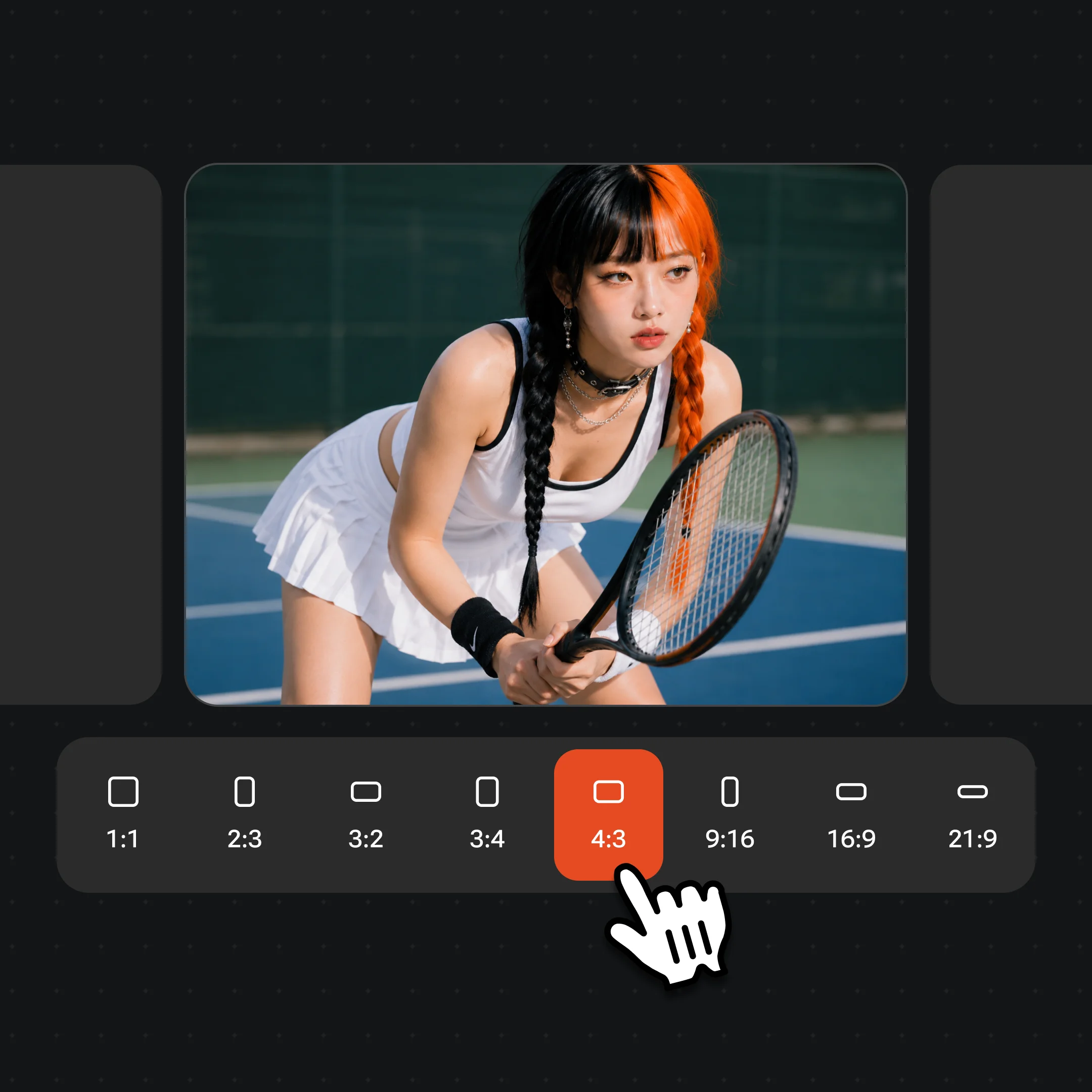
Selecciona Sunburst o Flare en el selector de modelos, fija la relación de aspecto y la resolución, y descarga.
Resultados reales de los modelos de imagen de Renoise, más una de las demos de lanzamiento de la propia OpenAI donde ilustra mejor la idea.

Una cabina llena: caras a tres profundidades distintas, una sola fuente de luz y ningún extra derretido al fondo.

Dos personas reinterpretadas como retratos de estudio de los años ochenta a partir de sus propias fotos, con los rasgos aún reconocibles. Imágenes de demostración oficiales de OpenAI.

Neón, luz derramada de las vallas publicitarias y farolas cayendo sobre la piel, el nailon y el asfalto mojado como cada superficie debería recibirla.

Pide un render 3D de juguete blando y el material sigue siendo fieltro de principio a fin, en vez de derivar otra vez hacia la fotografía.
OpenAI lanzó GPT Image 2.5 el 8 de septiembre de 2026. En ChatGPT aparece como ChatGPT Images 2.5; en la API llega como dos modelos, GPT-Image-2.5 Flare y GPT-Image-2.5 Sunburst. Flare es el modelo pequeño y rápido, con una calidad que OpenAI describe como comparable a la de GPT Image 2; Sunburst es el modelo base, de más calidad y más lento, pensado para trabajos en los que la precisión al editar es lo que manda.
La mejora va de control. La lista es de OpenAI: ediciones que solo cambian lo que has pedido, instrucciones que se sostienen a lo largo de varios turnos, fotos de referencia cuyos protagonistas siguen siendo reconocibles, más apego al estilo visual que indiques, más acierto en composiciones complejas y hasta un 50% menos de latencia. La resolución y las relaciones de aspecto no cambian respecto a GPT Image 2, y OpenAI no afirma nada sobre un mejor renderizado de texto.
Renoise lleva las dos variantes en el selector de modelos de imagen, por delante de GPT Image 2. Cada una genera desde un prompt o desde hasta tres fotos de referencia, en 1K, 2K o 4K y con ocho relaciones de aspecto, cobrando por generación con los créditos de tu plan. GPT Image 2 sigue disponible y sigue siendo el motor de las herramientas Borrar, Retoque local y Ampliar.
8 sep 2026
ChatGPT Images 2.5 llega a todos los planes de ChatGPT; Flare y Sunburst aterrizan ese mismo día en la API de imágenes.
8 sep 2026
OpenAI parte el modelo en la API: Sunburst para la precisión al editar, Flare para la generación rápida del día a día.
11 sep 2026
Sunburst y Flare entran en el selector de modelos de imagen de Renoise, por delante de GPT Image 2, en 1K / 2K / 4K.
Los dos modelos están en el selector de Renoise. Son herramientas distintas, no una ruta de actualización: el anterior no se retira.
| En Renoise | GPT Image 2.5 (Recommended) | GPT Image 2 |
|---|---|---|
| Comportamiento al editar | Solo cambia lo que nombras; se sostiene entre turnos | Punto de partida; puede derivar de una ronda a otra |
| Imágenes de referencia | Hasta 3 por generación | Hasta 16 fusionadas en una sola generación |
| Variantes | Sunburst (precisión) y Flare (velocidad) | Una sola entrada |
| Salida | 1K / 2K / 4K, 8 relaciones de aspecto | 1K / 2K / 4K, 8 relaciones de aspecto |
| Borrar, Retoque local y Ampliar | — | Mueve las tres herramientas |
| Elígelo cuando | Quieres el modelo más nuevo de OpenAI o una edición precisa | Necesitas muchas referencias o las herramientas de edición |
Desbloquea GPT Image 2.5 Sunburst, Flare y todos los demás modelos con un solo plan de Renoise.
Para quienes crean contenido con IA por primera vez
Se facturan $168 al año
Actualizar planAhorra $72/año
Para creadores que publican contenido cada semana.
Se facturan $504 al año
Actualizar planAhorra $216/año
Para estudios y profesionales que producen a escala comercial.
Se facturan $1680 al año
Actualizar planAhorra $720/año
Para quienes crean contenido con IA por primera vez
Facturación mensual
Actualizar planPara creadores que publican contenido cada semana.
Facturación mensual
Actualizar planPara estudios y profesionales que producen a escala comercial.
Facturación mensual
Actualizar planSe renueva automáticamente cada año hasta que canceles.
Se renueva automáticamente cada mes hasta que canceles.
Sí. OpenAI lo lanzó el 8 de septiembre de 2026: en ChatGPT como ChatGPT Images 2.5 y en la API como GPT-Image-2.5 Flare y Sunburst. En Renoise, las dos variantes son entradas del selector de modelos de imagen.
Flare es el modelo pequeño y rápido, con una calidad de imagen que OpenAI describe como comparable a la de GPT Image 2 y hasta un 50% menos de latencia. Sunburst es el modelo base: más calidad que GPT Image 2, tiempos de generación más largos y pensado para ediciones en las que la precisión es lo que importa. Renoise muestra Sunburst primero, y los dos cuestan lo mismo.
Control. Las ediciones cambian solo lo que has pedido y se sostienen a lo largo de varios turnos, los protagonistas de las fotos de referencia siguen siendo reconocibles, los estilos visuales se respetan mejor, las composiciones complejas salen más acertadas y la generación es hasta un 50% más rápida. Los límites de resolución no cambiaron.
OpenAI no lo afirma. El anuncio no dice nada sobre el renderizado de texto y la documentación para desarrolladores sigue listando la colocación precisa del texto como una limitación de los modelos GPT Image. Los titulares cortos salen fiables; el texto denso hay que revisarlo. Para trabajos con mucha tipografía, Nano Banana Pro es la mejor opción dentro de Renoise.
En Renoise eliges 1K, 2K o 4K con ocho relaciones de aspecto, de 1:1 a 21:9. La API de OpenAI limita cada lado a 3840 píxeles y la imagen entera a 8,3 megapíxeles, y marca como experimental todo lo que supere 2560 × 1440.
Hasta 3 por generación en Renoise, con cualquiera de las dos variantes. La API de OpenAI acepta hasta 16, igual que la entrada de GPT Image 2 en Renoise, así que si tu trabajo consiste en fusionar muchas referencias en vez de editar una sola imagen, elige GPT Image 2.
Con las herramientas dedicadas, no. Borrar, Retoque local y Ampliar de Renoise funcionan con GPT Image 2. GPT Image 2.5 edita por instrucción: sube la foto, describe la única cosa que quieres cambiar y deja el resto en paz.
En la API de OpenAI la tarifa por token es idéntica a la de GPT Image 2 ($8 de entrada y $30 de salida por millón de tokens de imagen), pero una imagen de 1024 × 1024 en calidad alta cuesta unos $0.053 en lugar de $0.21, porque se reasignaron los niveles de calidad. En Renoise gastas créditos de tu plan por generación, según la resolución y sin límites diarios.
No. La página de obsolescencias de OpenAI no fija ninguna fecha de cierre para gpt-image-2, y sigue siendo el reemplazo recomendado para los modelos GPT Image anteriores. En Renoise se queda en el selector junto a las dos variantes de 2.5, y sigue siendo el modelo detrás de las herramientas de edición de imagen.
OpenAI. Renoise lo integra junto a Nano Banana Pro, Seedream 5.0, Midjourney y Grok Imagine en un solo plan; Renoise no entrena modelos de imagen por su cuenta.
Sube una foto, di qué cambiar y conserva todo lo demás. Un plan, todos los modelos.