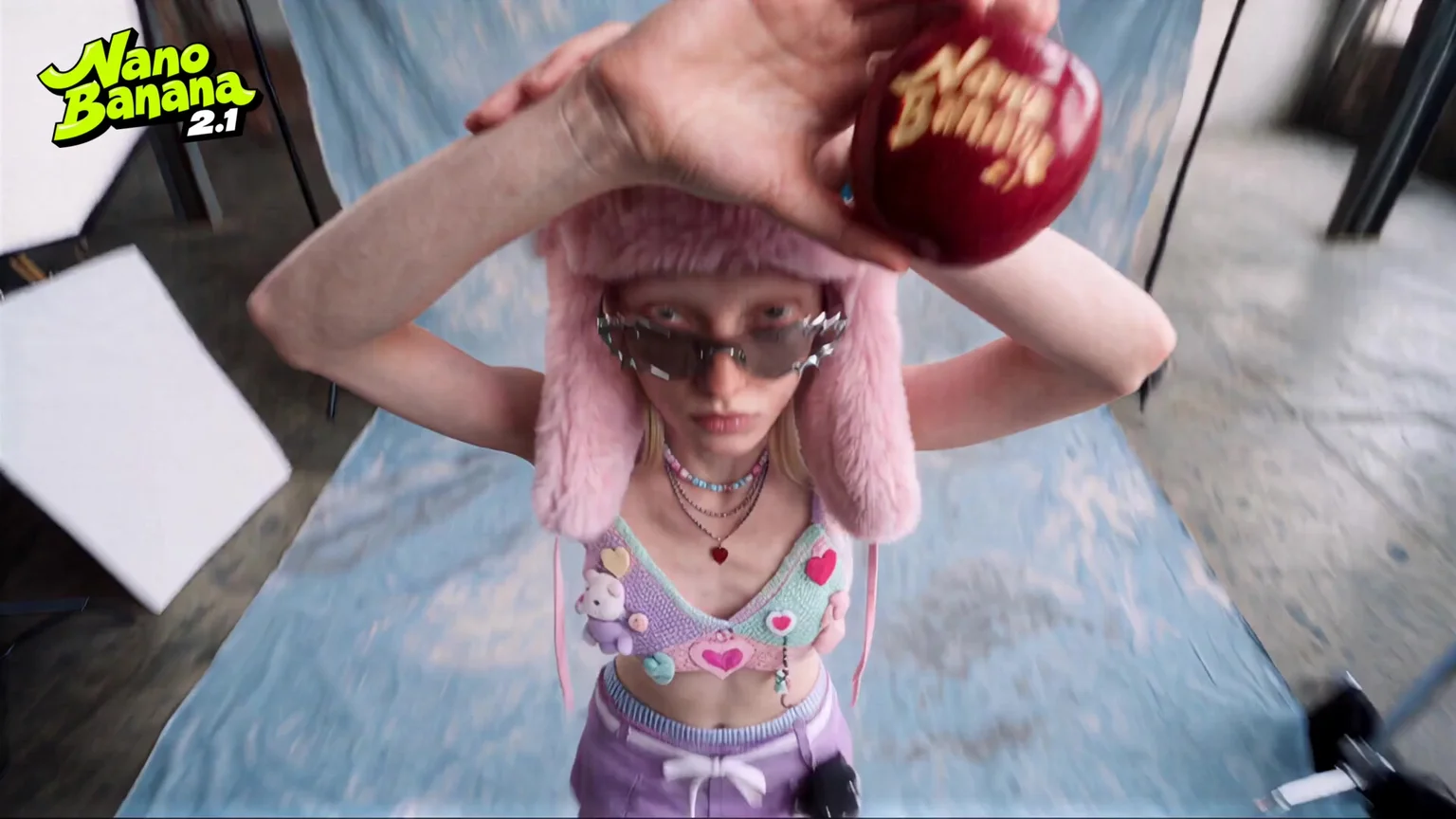
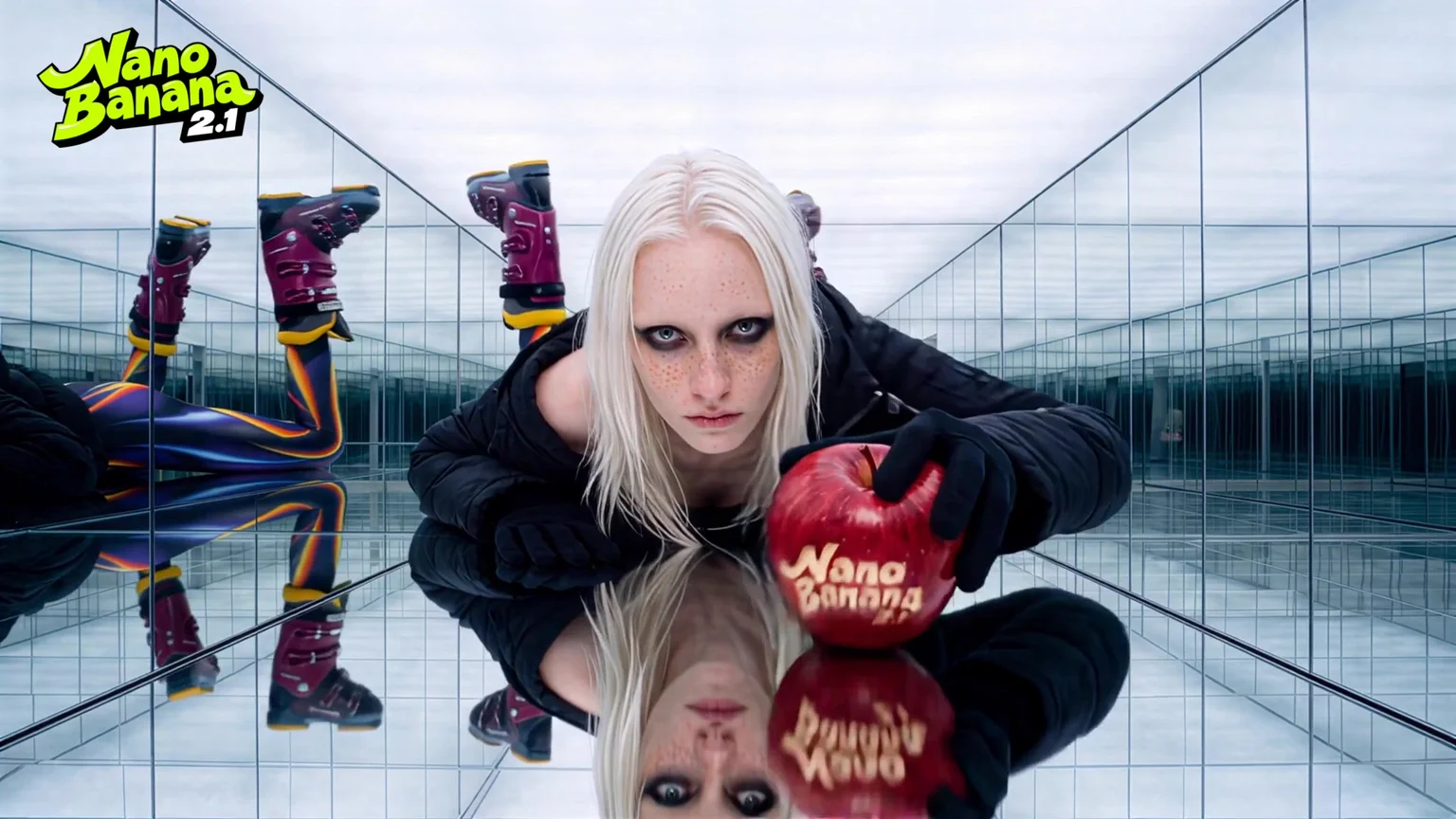
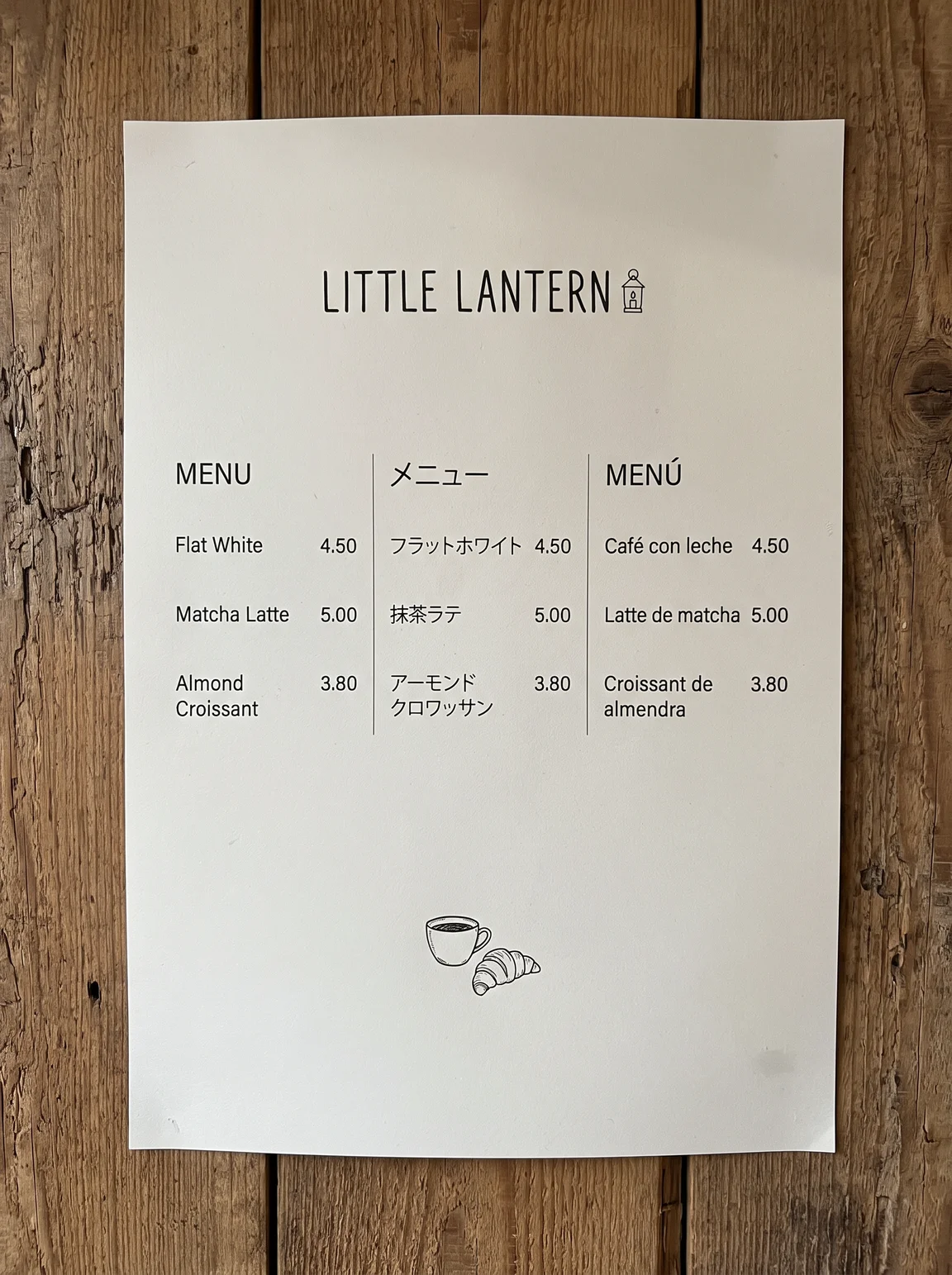
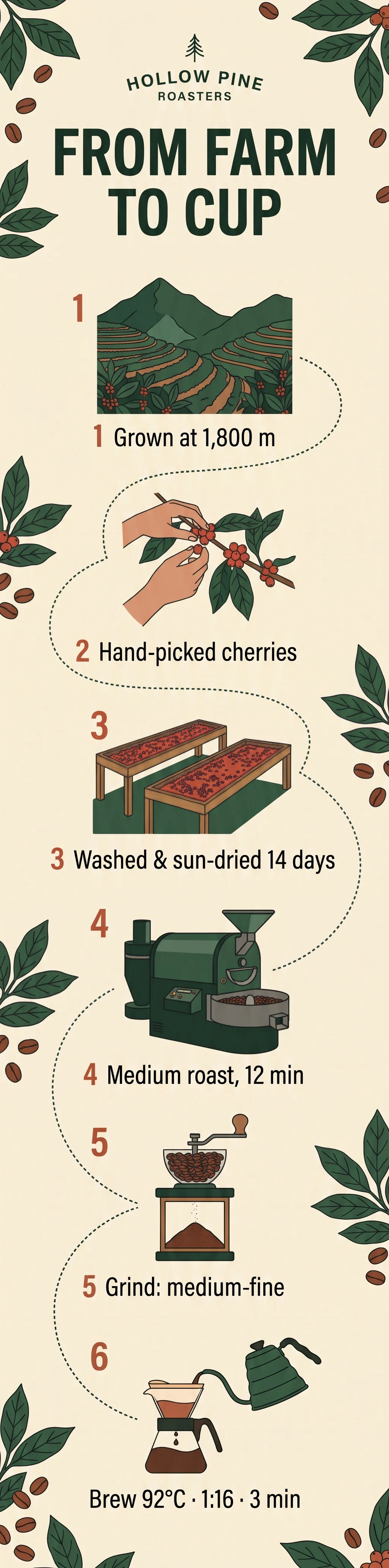
Das aktuelle Nano Banana von Google. Bis zu 14 Referenzbilder, 1K bis 4K und Formate von 1:8 bis 8:1.
Nano Banana 2.1: die wichtigsten Funktionen
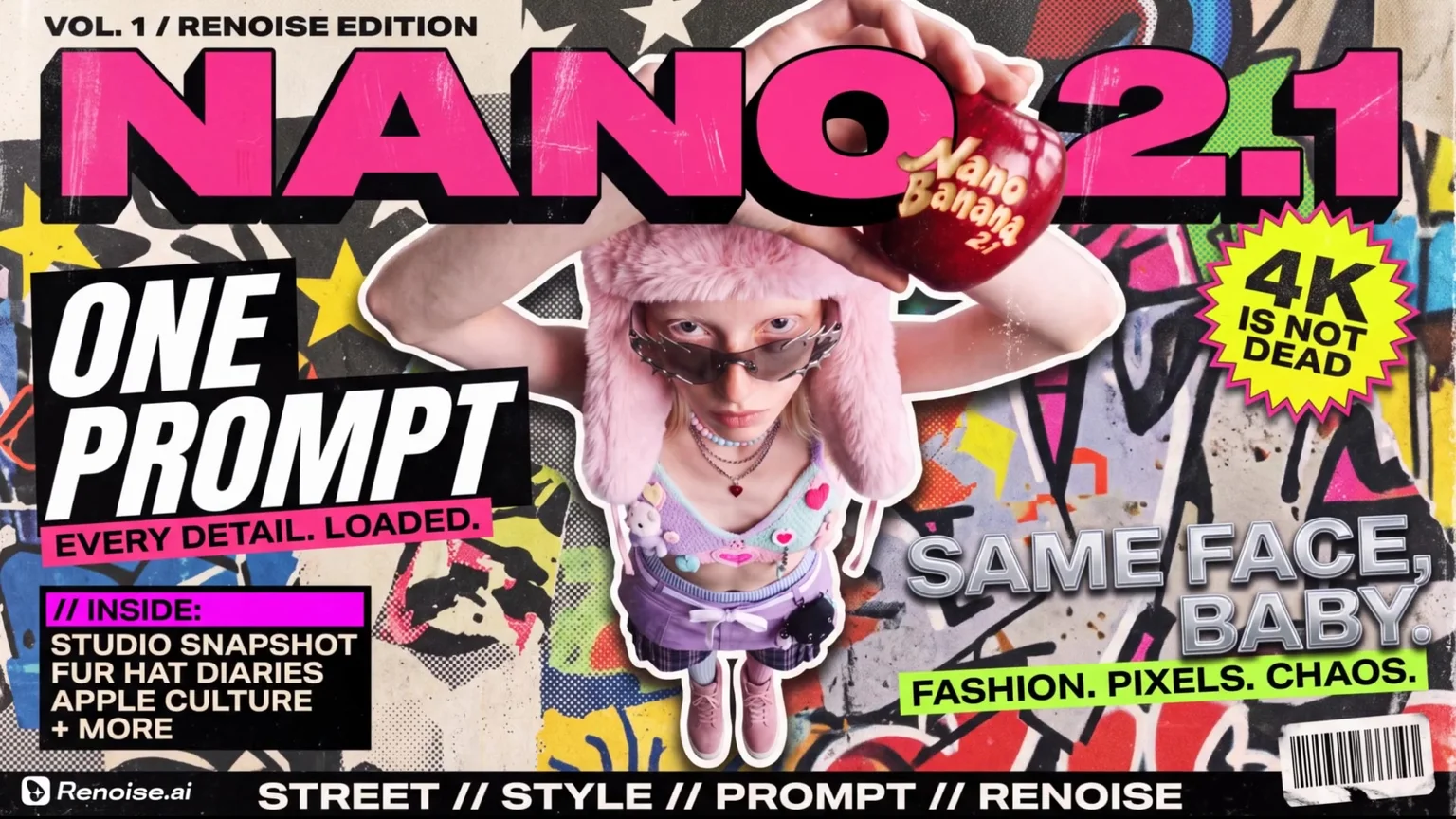
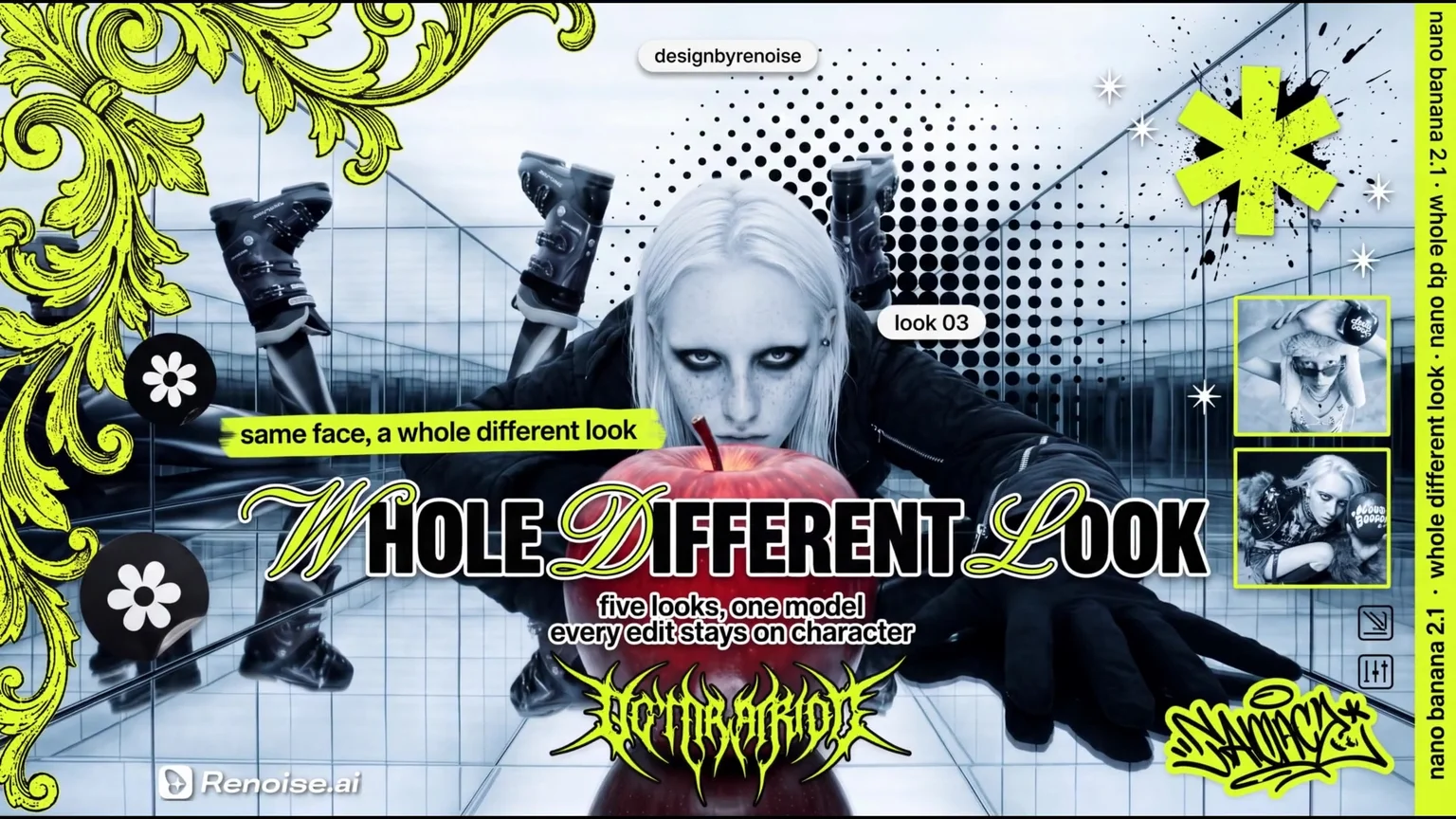
Die Zeilen 3–5 sind einzelne Nano-Banana-2.1-Generierungen in 2K aus Renoise. Die Zeilen 1–2 sind Standbilder aus dem Renoise-Launchfilm zum Modell.
Natives 4K, dazu 1K für Entwürfe
Wähle pro Bild 1K, 2K oder 4K. Entwirf in 1K für 9 Credits und rendere den Favoriten dann in 4K – für Druck, Banner oder einen Ausschnitt, in den man hineinzoomen kann. Stoff, Haare und die in den Apfel geschnitzten Buchstaben bleiben in voller Größe scharf.
Dasselbe Gesicht in jeder Szene, aus bis zu 14 Referenzen
Gib pro Prompt bis zu 14 Referenzbilder mit. Laut Google hält 2.1 bis zu 4 Figuren und 10 Objekte konsistent – so wandern dasselbe Model und derselbe geschnitzte Apfel vom Studio in einen Spiegelsaal und weiter aufs Dach.
Text in drei Sprachen auf einem Plakat
Setz den genauen Wortlaut in Anführungszeichen. Diese Speisekarte sollte Spalten auf Englisch, Japanisch und Spanisch mit Preisen haben – jede Überschrift, jedes Gericht und jeder Preis stand beim ersten Versuch so da wie angefragt. Google nennt Textdarstellung als einen der größten Fortschritte gegenüber Nano Banana 2.
Infografiken im hohen 1:4-Format
Google meldet einen deutlichen Sprung bei der Genauigkeit von Infografiken. Ein einziger Prompt ergab diese sechsstufige Grafik vom Anbau bis zur Tasse in 1:4 – mit nummerierten Schritten, Zeichnungen und allen sechs Textzeilen, inklusive 1,800 m und 92°C, genau wie vorgegeben.
Extreme Formate: Panoramen von 1:8 bis 8:1
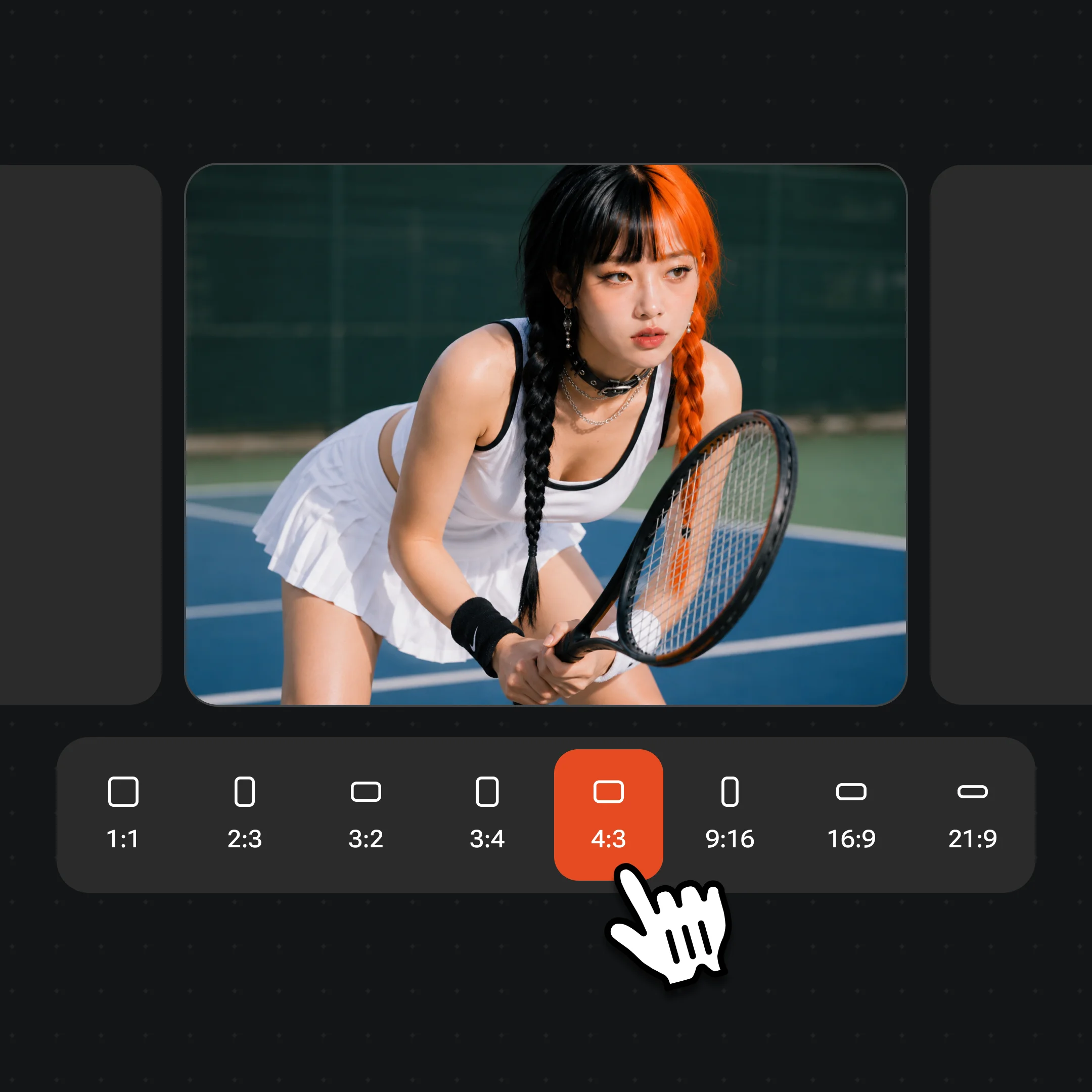
Nano Banana 2.1 bietet 14 Formate, darunter 1:4, 4:1, 1:8 und 8:1. Laut Google ist das Kachelmuster behoben, das Nano Banana 2 bei sehr breiten Bildern zeigen konnte. Diese 8:1-Hafenskyline ist eine durchgehende Szene ohne doppelte Gebäude.
Nano Banana 2.1 ist das Modell von Google DeepMind zum Generieren und Bearbeiten von Bildern, veröffentlicht am 6. Oktober 2026. Es basiert auf Gemini 3.6 Flash, löst Nano Banana 2 (Gemini 3.1 Flash Image) ab, und Google bezeichnet es als effizienteres Gegenstück zu Nano Banana Pro. In der Gemini API heißt es `gemini-nano-banana-2.1`.
In Renoise ist es seit dem 13. Oktober 2026 verfügbar – im Canvas, in der API und im Agent-Plugin, mit einem Abo zusammen mit über 30 weiteren Bild- und Videomodellen.
Du brauchst dasselbe Gesicht über viele Shots oder ein druckfertiges Layout? Probier Nano Banana Pro. Du suchst das günstigste 4K? Nano Banana 2 kostet 18 Credits.
Nano Banana 2.1 auf einen Blick
Referenzbilder
14
Pro Bild; höchstens 4 Personen
Max. Auflösung
4K
1K · 2K · 4K
Breitestes Format
8:1
14 Formate, von 1:8 bis 8:1
Credits in 2K
13
9 in 1K, 25 in 4K
Spezifikationen und Credits wie in Renoise verfügbar, Stand 11. November 2026.
Mit Nano Banana 2.1 erstellte Bilder
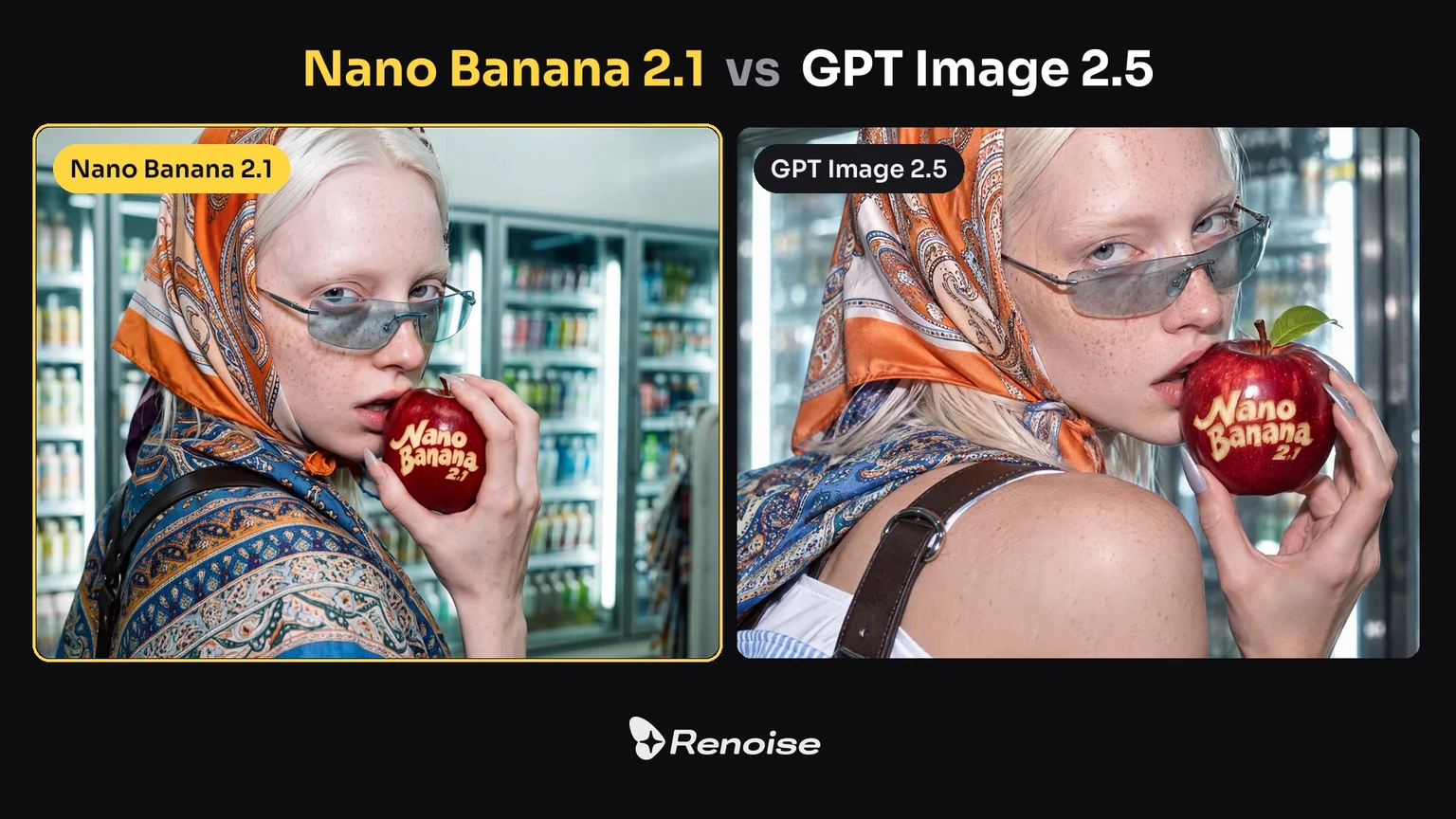
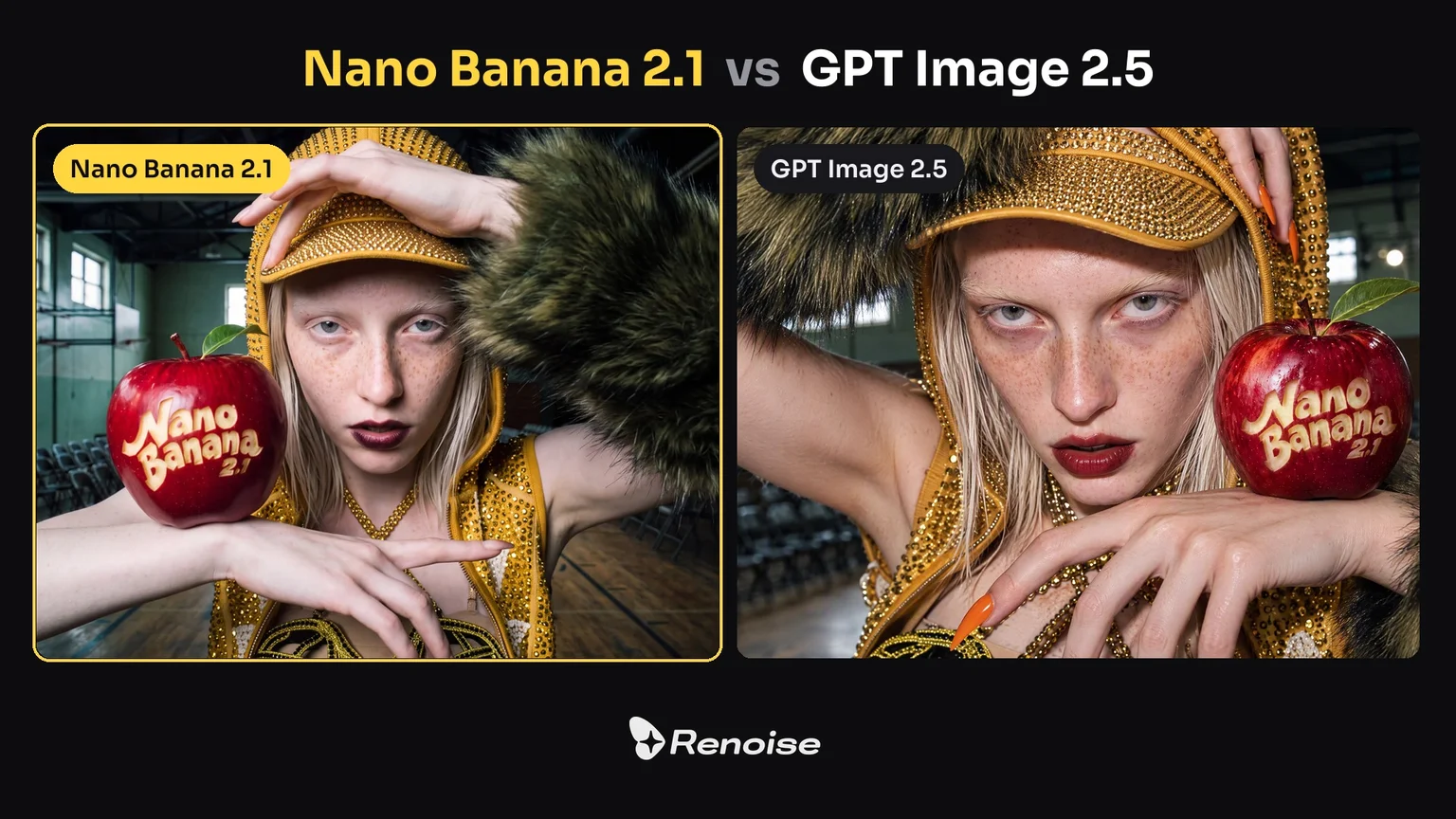
Plakate aus dem Renoise-Launchfilm und zwei Vergleiche mit GPT Image 2.5 beim selben Prompt.
Ein Zine-Cover mit gestapelter Typo
Titelschriftzug, Coverzeilen, ein Sticker-Button und ein Barcode rund um eine Figur, aus dem Launchfilm.
Ein vielschichtiges Modeplakat
Ornamente, Rasterpunkte, Schreibschrift und eingesetzte Fotos – mit dem Model aus der Spiegelsaal-Szene.
Editorial im Kiosk vs. GPT Image 2.5
Gleicher Prompt. Nano Banana 2.1 (links) wählte einen weiteren Ausschnitt und behielt den Laden im Bild.
Fashion-Shooting im Gym vs. GPT Image 2.5
Gleicher Prompt. Beide schrieben den geschnitzten Apfel richtig; Nano Banana 2.1 (links) zeigt mehr vom Gym.
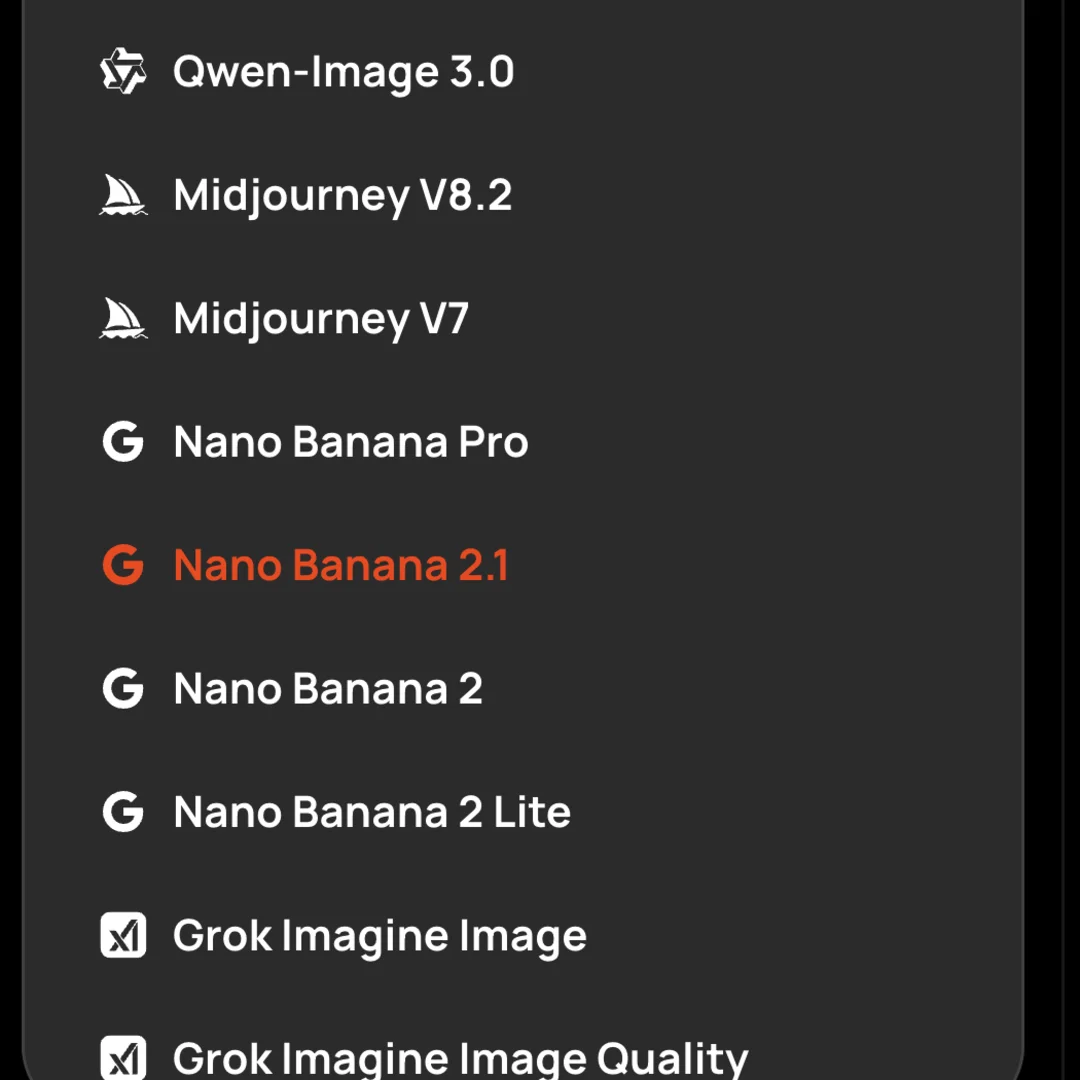
Öffne Images und wähle Nano Banana 2.1 im Modellmenü. Teste die Idee zuerst in 1K und wechsle dann auf 2K oder 4K. Zur Wahl stehen 14 Formate, von 1:1 und 9:16 bis zu 8:1-Bannern.
Schritt 2
Referenzen hochladen und jede benennen
Lade bis zu 14 Bilder hoch und sag, wofür jedes steht: „Bild 1 ist das Model, Bild 2 die Tasche.“ Bleib bei höchstens 4 Personen und setz Wörter, die im Bild stehen müssen, in Anführungszeichen.
Schritt 3
Generieren und mit dem Ergebnis weiterarbeiten
Nimm das Ergebnis als nächste Referenz und ändere jeweils nur eine Sache. Nutzer berichten, dass 2.1 leere Flächen gern auffüllt – schreib also „Hintergrund schlicht lassen“ oder „sonst nichts“, wenn es clean bleiben soll.
Google veröffentlicht Nano Banana 2 (Gemini 3.1 Flash Image) als schnelles Standard-Bildmodell in der Gemini-App.
Google veröffentlicht Nano Banana 2.1
Nano Banana 2.1 kommt in die Gemini-App, den KI-Modus der Google-Suche, AI Studio und die Gemini API als `gemini-nano-banana-2.1`. Am selben Tag markiert Google Nano Banana 2 in der API als veraltet.
Nano Banana 2.1 in Renoise
Nano Banana 2.1 kommt in die Bildmodell-Auswahl von Renoise, zwischen Nano Banana Pro und Nano Banana 2 – mit 1K bis 4K, 14 Formaten und 14 Referenzen, im Canvas, in der API, im CLI und über MCP.
Quellen: Model Card von Google DeepMind, Gemini-API-Dokumentation, Modellliste und Integrationsprotokolle von Renoise. Zuletzt aktualisiert
Nano Banana 2.1 vs. Nano Banana Pro: Welches ist besser?
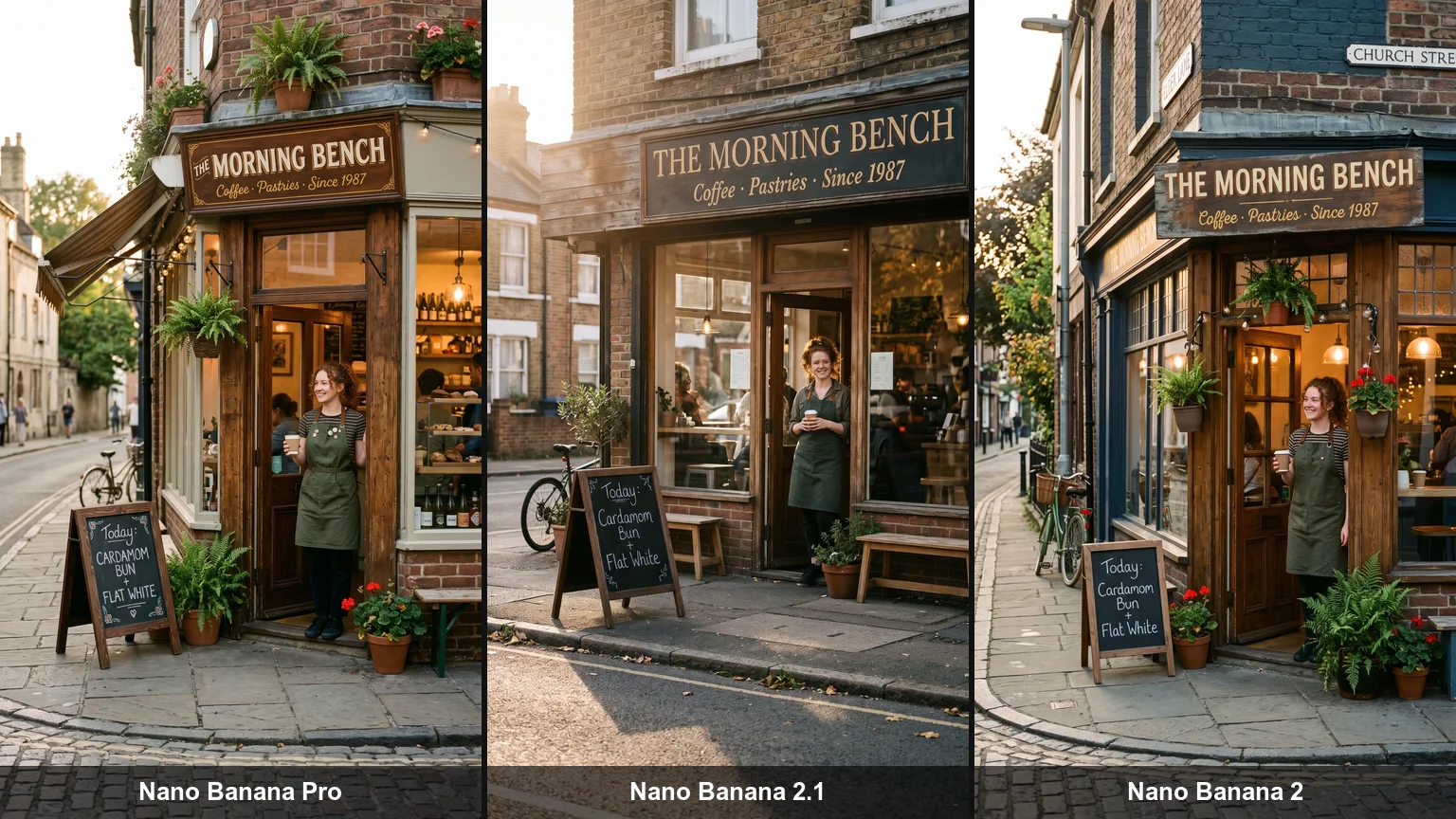
Ein Prompt für eine Ladenfront, 2K 9:16, je ein Durchlauf in Renoise: Nano Banana Pro, Nano Banana 2.1 und Nano Banana 2, von links nach rechts.
Alle drei Modelle schrieben Schild und Kreidetafel richtig. Je ein Durchlauf, 27. Oktober 2026.
01
2.1 liegt in öffentlichen Rankings vorn
In der Text-to-Image-Arena von Artificial Analysis (27. Oktober 2026) kam Nano Banana 2.1 auf 1176 Punkte, Pro auf 1118 und Nano Banana 2 auf 1140. Arena führte es zum Start auf Platz 5 bei Text-to-Image.
02
Pro bleibt bei Ähnlichkeit und Feinschliff vorn
In direkten Vergleichstests hielt Pro ein Gesicht über mehrere Szenen besser und lieferte druckfertigere Layouts, dazu überzeugendere Größenverhältnisse und mehr Realismus. Manche Nutzer berichten außerdem, dass 2.1 präzise Anweisungen ignorieren kann.
03
2.1 kostet weniger und nimmt mehr Referenzen
In Renoise kostet 2.1 9 / 13 / 25 Credits in 1K / 2K / 4K, Pro dagegen 16 / 16 / 28 – und 2.1 nimmt in der Web-App 14 Referenzen statt 5.
04
Was sich gegenüber Nano Banana 2 geändert hat
Google nennt besseren Text, bessere Infografiken, mehr Konsistenz bei mehreren Figuren und kein Kachelmuster mehr bei breiten Bildern in 2K und 4K. In 4K bleibt Nano Banana 2 günstiger: 18 statt 25 Credits.
Nano Banana 2.1 vs. Nano Banana 2 vs. Pro vs. GPT Image 2.5
Vier Bildmodelle aus der Renoise-Auswahl, verglichen nach den Limits, die Renoise freigibt. Alle vier liefern 1K, 2K und 4K.
Nano Banana 2.1 im Vergleich mit Nano Banana 2, Nano Banana Pro und GPT Image 2.5 Sunburst: Formate, Referenzen und Credits in Renoise
In Renoise
Nano Banana 2.1
Nano Banana 2
Nano Banana Pro
GPT Image 2.5 Sunburst
Anbieter
Google
Google
Google
OpenAI
Seitenverhältnisse
14, inkl. 1:8 und 8:1
14, inkl. 1:8 und 8:1
10, bis 21:9
8, bis 21:9
Referenzbilder (Web-App)
14 (Personen ≤4)
5
5
16
Credits · ein Bild in 2K
13
12
16
23
Credits · ein Bild in 4K
25
18
28
28
Ideal für
Alltagsarbeit, viele Referenzen, breite Formate
Das günstigste 4K
Ein Gesicht über viele Shots, druckfertige Layouts
Lange, strukturierte Prompts
Modellliste und Credit-Schätzungen von Renoise (Stand 2026-11-11).
Stand Oktober 2026 nutzen über 100.000 Creator in mehr als 170 Ländern und Regionen Renoise AI, eine KI-Plattform für Video, Bild und Audio, und haben mit über 30 Modellen mehr als 300.000 Bilder und Videos generiert.
Creator
100K+
Registrierte Konten bei Renoise seit März 2026
Länder und Regionen
170+
Von wo sich Creator in den letzten 90 Tagen angemeldet haben
Generierte Bilder und Videos
300K+
Abgeschlossene Generierungen, März–Oktober 2026
KI-Modelle
30+
Seedance, Kling, GPT Image, Midjourney und mehr in einem Abo
Quelle: interne Daten von Renoise, März–Oktober 2026. Die Zahlen sind abgerundet und werden vierteljährlich aktualisiert. Zuletzt aktualisiert
Was Creator über Renoise sagen
Echtes Feedback von Creatorn, die mit Renoise AI Videos, Bilder und Anzeigen erstellen.
LLộc Bùi Nguyễn Vinh
Renoise is pretty easy to use, with a clean and smooth interface. The results from Seedance 2.5 also feel noticeably smoother in action sequences.
FFaith Joy Cloma
Renoise Ai is a good tool for making ai videos and photos. it puts several Ai models in one place, so you don't need to use many different apps.
Renoise has been a great platform for AI creativity. The tools are easy to use, the experience is smooth, and it makes creating content more enjoyable and efficient. I really appreciate the work the team is doing and look forward to seeing more improvements. Highly recommended!
Ssergio ramos
What I like about Renoise AI compared to other platforms: Fast generation speed: Slow generation takes up way too much time, but Renoise AI is surprisingly about 30% faster. Intuitive and user-friendly UI: Cheaply made platforms have terrible UIs that make me not even want to log in, but Renoise is very clean and convenient. Remembers my previous settings: It helpfully remembers my last workspace settings. Some odd platforms force you to re-adjust everything every single time you generate a video, which is extremely frustrating. Overall preference: For all these reasons, Renoise AI is definitely my preferred platform. Thank you!
ZZeus
Renoise is your go to one stop all for ai creators. all view and use all models in one place, for any type of content you have your mind on!
MMichał Reszka
I have a creat experience with the app. Consistent characters but also unique. THere were some issues with storyline continuity and non-typical humanoid characters.
LLộc Bùi Nguyễn Vinh
Renoise is pretty easy to use, with a clean and smooth interface. The results from Seedance 2.5 also feel noticeably smoother in action sequences.
FFaith Joy Cloma
Renoise Ai is a good tool for making ai videos and photos. it puts several Ai models in one place, so you don't need to use many different apps.
Renoise has been a great platform for AI creativity. The tools are easy to use, the experience is smooth, and it makes creating content more enjoyable and efficient. I really appreciate the work the team is doing and look forward to seeing more improvements. Highly recommended!
Ssergio ramos
What I like about Renoise AI compared to other platforms: Fast generation speed: Slow generation takes up way too much time, but Renoise AI is surprisingly about 30% faster. Intuitive and user-friendly UI: Cheaply made platforms have terrible UIs that make me not even want to log in, but Renoise is very clean and convenient. Remembers my previous settings: It helpfully remembers my last workspace settings. Some odd platforms force you to re-adjust everything every single time you generate a video, which is extremely frustrating. Overall preference: For all these reasons, Renoise AI is definitely my preferred platform. Thank you!
ZZeus
Renoise is your go to one stop all for ai creators. all view and use all models in one place, for any type of content you have your mind on!
MMichał Reszka
I have a creat experience with the app. Consistent characters but also unique. THere were some issues with storyline continuity and non-typical humanoid characters.
LLộc Bùi Nguyễn Vinh
Renoise is pretty easy to use, with a clean and smooth interface. The results from Seedance 2.5 also feel noticeably smoother in action sequences.
FFaith Joy Cloma
Renoise Ai is a good tool for making ai videos and photos. it puts several Ai models in one place, so you don't need to use many different apps.
Renoise has been a great platform for AI creativity. The tools are easy to use, the experience is smooth, and it makes creating content more enjoyable and efficient. I really appreciate the work the team is doing and look forward to seeing more improvements. Highly recommended!
Ssergio ramos
What I like about Renoise AI compared to other platforms: Fast generation speed: Slow generation takes up way too much time, but Renoise AI is surprisingly about 30% faster. Intuitive and user-friendly UI: Cheaply made platforms have terrible UIs that make me not even want to log in, but Renoise is very clean and convenient. Remembers my previous settings: It helpfully remembers my last workspace settings. Some odd platforms force you to re-adjust everything every single time you generate a video, which is extremely frustrating. Overall preference: For all these reasons, Renoise AI is definitely my preferred platform. Thank you!
ZZeus
Renoise is your go to one stop all for ai creators. all view and use all models in one place, for any type of content you have your mind on!
MMichał Reszka
I have a creat experience with the app. Consistent characters but also unique. THere were some issues with storyline continuity and non-typical humanoid characters.
LLộc Bùi Nguyễn Vinh
Renoise is pretty easy to use, with a clean and smooth interface. The results from Seedance 2.5 also feel noticeably smoother in action sequences.
FFaith Joy Cloma
Renoise Ai is a good tool for making ai videos and photos. it puts several Ai models in one place, so you don't need to use many different apps.
Renoise has been a great platform for AI creativity. The tools are easy to use, the experience is smooth, and it makes creating content more enjoyable and efficient. I really appreciate the work the team is doing and look forward to seeing more improvements. Highly recommended!
Ssergio ramos
What I like about Renoise AI compared to other platforms: Fast generation speed: Slow generation takes up way too much time, but Renoise AI is surprisingly about 30% faster. Intuitive and user-friendly UI: Cheaply made platforms have terrible UIs that make me not even want to log in, but Renoise is very clean and convenient. Remembers my previous settings: It helpfully remembers my last workspace settings. Some odd platforms force you to re-adjust everything every single time you generate a video, which is extremely frustrating. Overall preference: For all these reasons, Renoise AI is definitely my preferred platform. Thank you!
ZZeus
Renoise is your go to one stop all for ai creators. all view and use all models in one place, for any type of content you have your mind on!
MMichał Reszka
I have a creat experience with the app. Consistent characters but also unique. THere were some issues with storyline continuity and non-typical humanoid characters.
Wählen Sie Ihren Plan
Ein Renoise-Plan schaltet Nano Banana 2.1 und alle anderen Bild- und Videomodelle frei – abgerechnet pro Bild über die Credits deines Plans.
Der Agent bringt deine Idee bis zum fertigen Video.
Schneidet und montiert deine Clips
Kombiniert Ebenen, Text und Effekte
Konvertiert Formate für jede Plattform
Starter und Standard: Produktionsarbeit im Director Mode verbraucht Credits nach Nutzung. Advanced: kostenlos.
UNBEGRENZTE GENERIERUNGEN
MiniMax H3NICHT UNBEGRENZT
Seedance 2.0 MiniNICHT UNBEGRENZT
Seedream 5.0 ProNICHT UNBEGRENZT
✓Unbegrenzt viele gleichzeitige Generierungen
Keine Warteschlange. Starte beliebig viele bezahlte Generierungen gleichzeitig.
✓Renoise Agent (Beta) – im Chat erstellen
✓Frontier-Modell für den Agent
Renoise Agent nutzt Frontier-Modelle führender KI-Labore, um deine Shots zu planen, Prompts zu schreiben und für jeden Shot das passende Modell auszuwählen. Der Chat mit dem Agent ist in jedem Tarif kostenlos.
✓Unbegrenzte LLM-Chats
✓Kommerzielle Nutzung
Mit Renoise.ai erstellte Inhalte dürfen vorbehaltlich unserer Nutzungsbedingungen kommerziell genutzt werden
Der Agent bringt deine Idee bis zum fertigen Video.
Schneidet und montiert deine Clips
Kombiniert Ebenen, Text und Effekte
Konvertiert Formate für jede Plattform
Starter und Standard: Produktionsarbeit im Director Mode verbraucht Credits nach Nutzung. Advanced: kostenlos.
UNBEGRENZTE GENERIERUNGEN
MiniMax H37 TAGE UNBEGRENZT
Seedance 2.0 Mini7 TAGE UNBEGRENZT
Seedream 5.0 Pro7 TAGE UNBEGRENZT
Offizielle Modelle
Jeden Monat ab deinem Abrechnungsdatum für 7 Tage verfügbar
Die Generierungsgeschwindigkeit kann begrenzt sein
Nicht verfügbar in Renoise Agent, MCP oder CLI
✓Unbegrenzt viele gleichzeitige Generierungen
Keine Warteschlange. Starte beliebig viele bezahlte Generierungen gleichzeitig.
✓Renoise Agent (Beta) – im Chat erstellen
✓Frontier-Modell für den Agent
Renoise Agent nutzt Frontier-Modelle führender KI-Labore, um deine Shots zu planen, Prompts zu schreiben und für jeden Shot das passende Modell auszuwählen. Der Chat mit dem Agent ist in jedem Tarif kostenlos.
✓Unbegrenzte LLM-Chats
✓Kommerzielle Nutzung
Mit Renoise.ai erstellte Inhalte dürfen vorbehaltlich unserer Nutzungsbedingungen kommerziell genutzt werden
Der Agent bringt deine Idee bis zum fertigen Video.
Schneidet und montiert deine Clips
Kombiniert Ebenen, Text und Effekte
Konvertiert Formate für jede Plattform
Starter und Standard: Produktionsarbeit im Director Mode verbraucht Credits nach Nutzung. Advanced: kostenlos.
UNBEGRENZTE GENERIERUNGEN
MiniMax H32 TAGE UNBEGRENZT
Seedance 2.0 Mini2 TAGE UNBEGRENZT
Seedream 5.0 Pro2 TAGE UNBEGRENZT
Offizielle Modelle
Jeden Monat ab deinem Abrechnungsdatum für 2 Tage verfügbar
Die Generierungsgeschwindigkeit kann begrenzt sein
Nicht verfügbar in Renoise Agent, MCP oder CLI
✓Unbegrenzt viele gleichzeitige Generierungen
Keine Warteschlange. Starte beliebig viele bezahlte Generierungen gleichzeitig.
✓Renoise Agent (Beta) – im Chat erstellen
✓Frontier-Modell für den Agent
Renoise Agent nutzt Frontier-Modelle führender KI-Labore, um deine Shots zu planen, Prompts zu schreiben und für jeden Shot das passende Modell auszuwählen. Der Chat mit dem Agent ist in jedem Tarif kostenlos.
✓Unbegrenzte LLM-Chats
✓Kommerzielle Nutzung
Mit Renoise.ai erstellte Inhalte dürfen vorbehaltlich unserer Nutzungsbedingungen kommerziell genutzt werden
Der Agent bringt deine Idee bis zum fertigen Video.
Schneidet und montiert deine Clips
Kombiniert Ebenen, Text und Effekte
Konvertiert Formate für jede Plattform
Starter und Standard: Produktionsarbeit im Director Mode verbraucht Credits nach Nutzung. Advanced: kostenlos.
UNBEGRENZTE GENERIERUNGEN
MiniMax H37 TAGE UNBEGRENZT
Seedance 2.0 Mini7 TAGE UNBEGRENZT
Seedream 5.0 Pro7 TAGE UNBEGRENZT
Offizielle Modelle
Jeden Monat ab deinem Abrechnungsdatum für 7 Tage verfügbar
Die Generierungsgeschwindigkeit kann begrenzt sein
Nicht verfügbar in Renoise Agent, MCP oder CLI
✓Unbegrenzt viele gleichzeitige Generierungen
Keine Warteschlange. Starte beliebig viele bezahlte Generierungen gleichzeitig.
✓Renoise Agent (Beta) – im Chat erstellen
✓Frontier-Modell für den Agent
Renoise Agent nutzt Frontier-Modelle führender KI-Labore, um deine Shots zu planen, Prompts zu schreiben und für jeden Shot das passende Modell auszuwählen. Der Chat mit dem Agent ist in jedem Tarif kostenlos.
✓Unbegrenzte LLM-Chats
✓Kommerzielle Nutzung
Mit Renoise.ai erstellte Inhalte dürfen vorbehaltlich unserer Nutzungsbedingungen kommerziell genutzt werden
✓Export ohne Wasserzeichen
Nano Banana 2.1: häufige Fragen
1.Ist Nano Banana 2.1 schon verfügbar?
+
Ja. Google hat Nano Banana 2.1 am 6. Oktober 2026 veröffentlicht – in der Gemini-App, im KI-Modus der Google-Suche, in AI Studio und in der Gemini API. In Renoise ist es seit dem 13. Oktober 2026 live, im Canvas, in der API, im CLI und über MCP.
2.Wer hat Nano Banana 2.1 entwickelt?
+
Google DeepMind. Nano Banana 2.1 basiert auf Gemini 3.6 Flash und folgt auf Nano Banana 2 und Nano Banana Pro. Renoise trainiert keine Bildmodelle, sondern bindet Nano Banana 2.1 ein. Bilder aus bezahlten Renoise-Plänen haben kein sichtbares Wasserzeichen und dürfen kommerziell genutzt werden.
3.Was ist neu an Nano Banana 2.1?
+
Gegenüber Nano Banana 2 nennt Google bessere Textdarstellung und Infografiken, mehr Konsistenz bei mehreren Figuren über Bearbeitungen hinweg und saubere breite Panoramen in 2K und 4K ohne Kachelmuster. Dazu kommen Thinking-Stufen in der API von Google; Renoise nutzt die Standardeinstellung von Google.
4.Wie viele Referenzbilder kann Nano Banana 2.1 nutzen?
+
Bis zu 14 pro Bild in Renoise, auch in der Web-App. Bleib bei höchstens 4 Personen oder Figuren und benenne jede Referenz im Prompt. Nano Banana 2 und Nano Banana Pro nehmen in der Renoise-Web-App 5 Referenzen.
5.Unterstützt Nano Banana 2.1 4K und 8:1?
+
Ja. Nano Banana 2.1 liefert 1K, 2K oder 4K in 14 Seitenverhältnissen: 1:1, 2:3, 3:2, 3:4, 4:3, 4:5, 5:4, 9:16, 16:9 und 21:9, dazu die extremen Formate 1:4, 4:1, 1:8 und 8:1 für Banner und lange Infografiken.
6.Kann Nano Banana 2.1 mit Maske bearbeiten?
+
Die API von Google unterstützt Bearbeitungen per Maske, Renoise bietet Maskenbearbeitung für Nano Banana 2.1 aber noch nicht an. Lade das Bild stattdessen als Referenz hoch, beschreib die eine Änderung, die du willst, und nenne, was gleich bleiben muss.
7.Was kostet Nano Banana 2.1?
+
In Renoise kostet ein Bild mit Nano Banana 2.1 9 Credits in 1K, 13 in 2K und 25 in 4K. Nano Banana Pro kostet 16, 16 und 28, Nano Banana 2 kostet 8, 12 und 18. Die Credits kommen aus deinem Renoise-Plan; die Pläne findest du unter Preise.
8.Ist Nano Banana 2.1 kostenlos?
+
Nicht in Renoise: Jedes Bild wird über die Credits deines Abos abgerechnet, und 2.1 gehört zu keinem kostenlosen Angebot und keiner Unlimited-Aktion. In der Gemini-App von Google ist 2.1 den bezahlten Google-AI-Plänen vorbehalten; kostenlose Nutzer bekommen Nano Banana 2.
9.Gibt es eine API für Nano Banana 2.1?
+
Ja. In der Gemini API von Google heißt es `gemini-nano-banana-2.1`. Über Renoise nutzt du den Modellnamen `nano-banana-2.1` – mit demselben API-Key, CLI und MCP wie für alle anderen Bild- und Videomodelle und mit denselben Credits.
10.Nano Banana 2.1 vs. GPT Image 2.5: Was soll ich nehmen?
+
Nimm Nano Banana 2.1 für viele Referenzen, extreme Formate und einen niedrigeren Preis in 2K. Nimm GPT Image 2.5 für lange, strukturierte Prompts und bis zu 16 Referenzen. Beide stehen in derselben Renoise-Auswahl; mehr unter GPT Image 2.5.
11.Welches Nano-Banana-Modell soll ich nutzen?
+
Für die meisten Aufgaben ist Nano Banana 2.1 der richtige Start. Nimm Nano Banana Pro für dasselbe Gesicht über viele Shots oder druckfertige Layouts, Nano Banana 2 für das günstigste 4K und Nano Banana 2 Lite für 1K-Entwürfe für 4 Credits.
Nano Banana 2.1 ist im Canvas.
14 Referenzen, bis zu 4K.
Generiere mit Nano Banana 2.1 in Renoise, von 1:8 bis 8:1, und wechsle im selben Canvas zu jedem anderen Bild- oder Videomodell.